CV

Malou Hermans

Medior UX/UI designer who makes complex products feel clear.

How I work

Four steps, the same in every project.

  1. Look and listen

    Interviews, a baseline test of what is there now, and desk research, before I draw a single screen.

    How it worked at H5mag
  2. Make it measurable

    I decide what “better” means first, so the result is a number and not my opinion.

    How it worked at StarNails
  3. Concepts with users

    Brainstorms, card sorting and storyboards, tried out with the people they are for.

    How it worked for Young voters
  4. Design, test, measure again

    Paper, Lo-Fi and Hi-Fi, each round tested with the same tasks as the baseline.

    1:28 became 0:05

About me

Hi, I’m Malou.

I’m a UX designer based in the Netherlands who loves turning messy, confusing problems into something that actually clicks for people.

After studying Communication and Multimedia Design at The Hague University of Applied Sciences and internships at Blazter and H5mag, I landed at Alphatax, untangling complex problems for a hard-to-reach audience.

There’s also a story behind “moemoemalou”: as a kid I was teased with “Malou de koe” (cow). These days I’ve made peace with it. Cows are gentle, curious, social animals, and honestly, I see a bit of myself in that. That is also where Moemoe comes from, the cow you keep running into on this site.

Next, I want to bring that research-led way of working to products with more room for character and craft.
Hi, I’m Malou.

Medior UX/UI Designer, cat lover, and a fan of a good chai latte.

Get to know me

A little about Malou.

  • NameMalou Hermans
  • BornSeptember 5, 2000, in Delft
  • Zodiac signVirgo
  • Lives inDelft, moving to Gouda with my partner this year
  • Wake me up forA dirty chai latte
  • Currently readingThrone of Glass series
  • Ideal Friday nightBouldering, then a movie
  • Can’t design withoutMy cats supervising
  • Dream tripMaldives or Iceland
  • Always in my bagA crochet hook

A bit about me

I’m curious by nature, I ask a lot of questions, and I’m happiest when I’m figuring out why something works the way it does, which is probably part of why UX design fits me so well. I take the people close to me seriously: I’m a good listener, I show up, and once you’re in my circle you’re in it for good. I also need my quiet, orderly moments just as much: a made bed, a solid to-do list, and a bit of structure keep me sane between the spontaneous stuff.

I’m a bit chaotic by default and I switch between things easily, so lists and calendars are how I keep hold of it. But the things I actually remember are the unplanned ones: a spontaneous road trip, a new dish that turned out well, a conversation that ran two hours longer than intended. I’m working on making more room for that side.

Give me a good book, a workout, or a new place to explore and I’m content. I’m still that shy kid at heart in a room full of strangers, but put me somewhere I feel safe and I don’t stop talking. Ask my partner how often he’s had to wait for me to finish a story before we could leave the house.

Where “moemoemalou” comes from

Fun fact: “Malou” rhymes with “koe” (cow) in Dutch, so as a kid I got teased with “Malou de koe”. These days I’ve made peace with it. Cows are gentle, social, surprisingly clever animals, and I’ll happily see a bit of myself in that. Moemoe, the cow you keep running into on this site, is a Highland cow for a reason: my family tree traces back to a Scottish clan, and on a trip to Scotland I fell for the Highland coos.

My path

From student to UX/UI designer.

Studied

Communication and Multimedia Design

The Hague University of Applied Sciences, where I first learned how to turn a rough problem into something clear.

I deliberately picked minors that sit just outside design. Psychology, both applied and biological, because understanding why people behave the way they do is most of this job. Film education, because a thing that moves has to earn its attention in the first second. And internet marketing, because somebody has to be able to say why a design should exist at all.

Agency internship

Blazter

My first taste of agency-side design work, on real briefs for real clients.

Graduation internship

H5mag

My graduation project. Not on the software itself, but on the website around it, so people could understand what the tool does before they bought it and while they were using it.

Alphatax

Junior to Medior UX/UI Designer

Joined as a junior and grew into my current role, picking up deep domain knowledge along the way: first about the problems themselves, and increasingly about designing the solutions to them.

Now

Medior UX/UI Designer at Alphatax

Still designing for a hard-to-reach audience, untangling dense problems and making them workable for people who never asked to become experts.

What I bring

Skills, tools, and the honest level I am at.

Dutch

Native

English

A big part of my working day now

Figma

My daily tool, comfortable and quick in it

Design systems

Building them up, learning primitive and semantic tokens

Scrum

Enough to hold my own in the ceremonies

B2B SaaS

Complex products for specialist users

Down the rabbit hole

Some things that make me, me.

  • ReadingFantasy, romance and dark romance
  • Grew up doingHorseback riding, and I still miss it
  • In the gymWeightlifting, still the best hour of my day
  • With my partnerBouldering, which is problem solving stuck to a wall
  • Biggest passionInterior design, ever since I started rearranging my bedroom every month as a kid
  • FilmsWatching and analysing them
  • Weakness forCats, cows, dogs and horses
  • Guilty pleasureTrue crime, the darker the better
  • At workHappiest around people, equally fine on my own

My work.

I make complex products feel simple for the people using them.

Work

Jobs and internships, from agency to product team.

Study cases

School projects in UX, research, film and animation.

Film education.

A minor spent watching, taking apart and making.

Year
2022 – 2023
Type
Minor, Fontys
My role
Directed one sequence, in a group
Made
Analyses, a review, essays, a portfolio, a short film

In short

The problem
A year outside design, to learn how a medium holds attention second by second.
My role
Directed one sequence of a short film in a group, plus analyses, a review and essays.
The result
Milk, a short film of nine minutes and forty seconds, shown in a cinema to the whole class.

The minor

A year outside design, on purpose.

I picked minors that sit just next to design rather than inside it, and film education at Fontys was the one I wanted most. The year was split between watching and making: film analyses, a review, an essay on a master talk by Achmed Akkabi, a written film portfolio, and a short film shot with a crew of fellow students.

Film is the medium that has to earn attention second by second. Nobody is obliged to keep watching, the same way nobody is obliged to keep reading a screen. That is the part I came for.

The short film

Milk: a man, his neighbour, and a dinner for two.

Tom is looking for his neighbour Jerry. He walks the corridor of his building and knocks on one door after another, waits, listens, and knocks again. Behind one of them he hears laughter. He keeps going.

Then he is back in his own apartment, and calm, because in his head it all fits now. He lays the table for two. He turns the tap and no water comes, but he washes his hands anyway and they stay as dirty as they were. He puts a pan on a hob that never lights, cracks an egg into it and stirs. Everything in the fridge has gone off, so the spoiled milk goes into the pan and the rest into the glasses. He serves it onto two plates and sits down.

TOM, with a cynical smile: “Well Jerry, I am glad I found you after all. Thanks again for the milk. I could not have made scrambled eggs otherwise.”

The camera turns to the chair on the right, where Jerry should be sitting. Nobody is there. Only his plate of raw egg and his glass of spoiled milk, cutlery untouched. The camera turns back. Tom laughs. Fade to black.

The film is cut into four sequences and we rotated the crew roles through them, so everybody did every job over the course of the film: editor on one, director on another, then camera, then set dresser. On sequence four, the dinner, I directed.

The complete film, nine minutes and forty seconds. Sequence four, the dinner, is the last one.

How we made it

Three documents between an idea and a film.

A story is not yet a film. What turns it into one is deciding, on paper, exactly what the camera does, and we did that in three passes.

Script

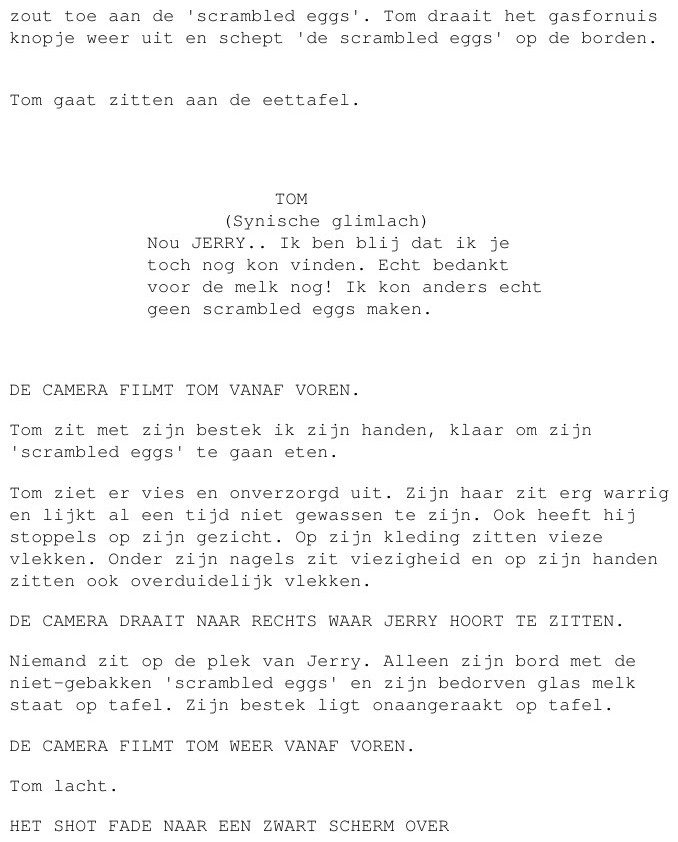
Written per sequence: what happens, what the room looks like, what the character says, and the camera directions in capitals between the action. Mine ends on three of those in a row, and the order of those three is the whole scene. The camera films Tom from the front. The camera turns right to where Jerry should be sitting. The camera films Tom from the front again. You can read the whole script here.

The last page of the script for sequence four, with the three camera directions

Storyboard

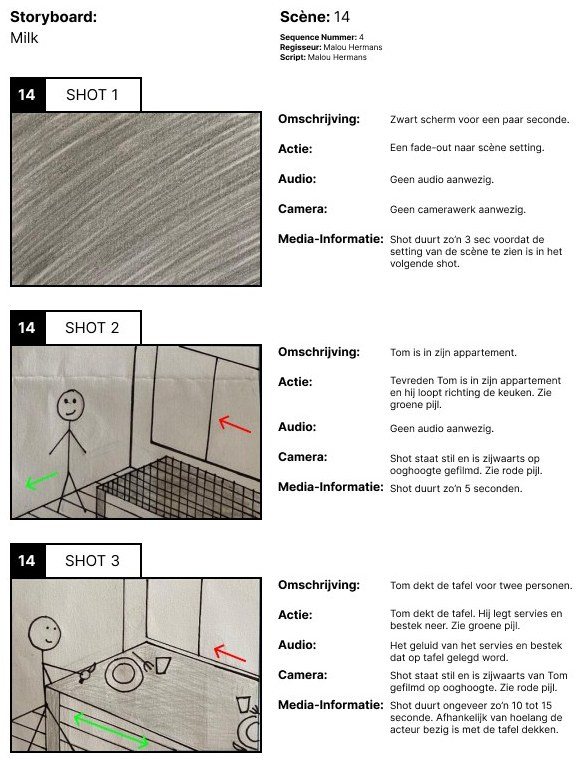
The storyboard settles what the script leaves open. Per shot: what is in frame, where the camera stands, how long it runs and what you hear. Drawn, because an argument about a shot is quicker to have over a drawing than over a paragraph. My sequence came to thirteen shots, and you can open all five pages here.

The first page of the storyboard for sequence four

Shot list

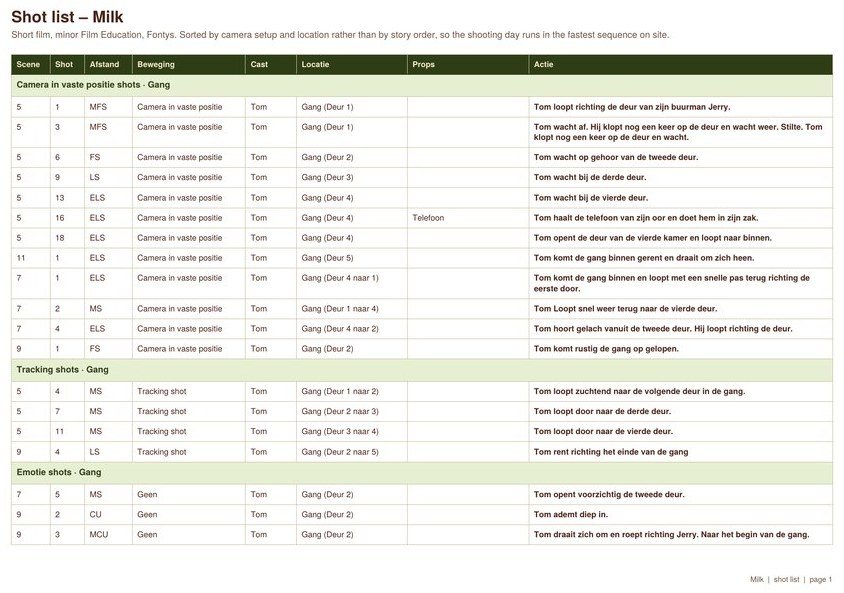
This is the one I would show a project manager rather than a film teacher. It holds every shot in the film, but it is not sorted by the story. It is sorted by where the camera stands and which room you are in: all the fixed camera shots in the corridor together, then all the tracking shots in the corridor together. Scene five, seven, nine and eleven sit in one block because they were filmed in one go.

On the day there is no time to film in the order people will watch it, so you film in the order that is fastest on location. The list is what stops you driving home having missed a shot. The full shot list is here.

A page of the shot list, grouped by camera setup and location

Fun facts

Four things about the day we filmed.

Shot in

The whole film was filmed in one afternoon.

Directors

Four sequences, four directors, one each. Mine was the dinner.

Location

The mise-en-scène is an old Campina office building.

Cast

One actor carries the entire film, and he is my boyfriend.

What I took from it

What you show first decides the rest.

A storyboard and a user flow are the same document with different words on it. Both decide what someone sees first, what you hold back, how long you let something sit before the next thing arrives. Film forces you to be exact about it, because you cannot ask the viewer to scroll back.

The analysing half changed how I give feedback. Taking a film apart means separating what you felt from what the maker actually did to make you feel it. That is the same move as separating a user’s opinion from their behaviour in a test, and it is the harder half of research.

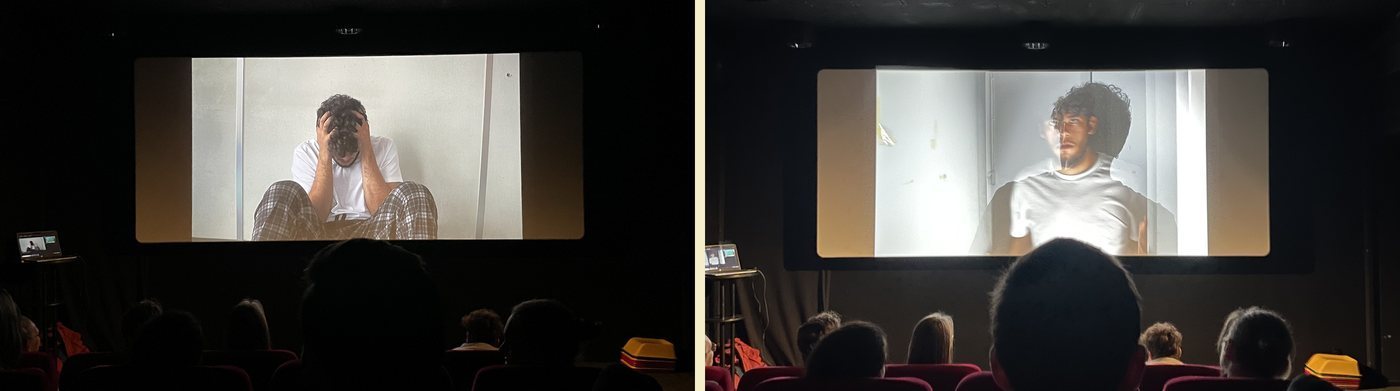
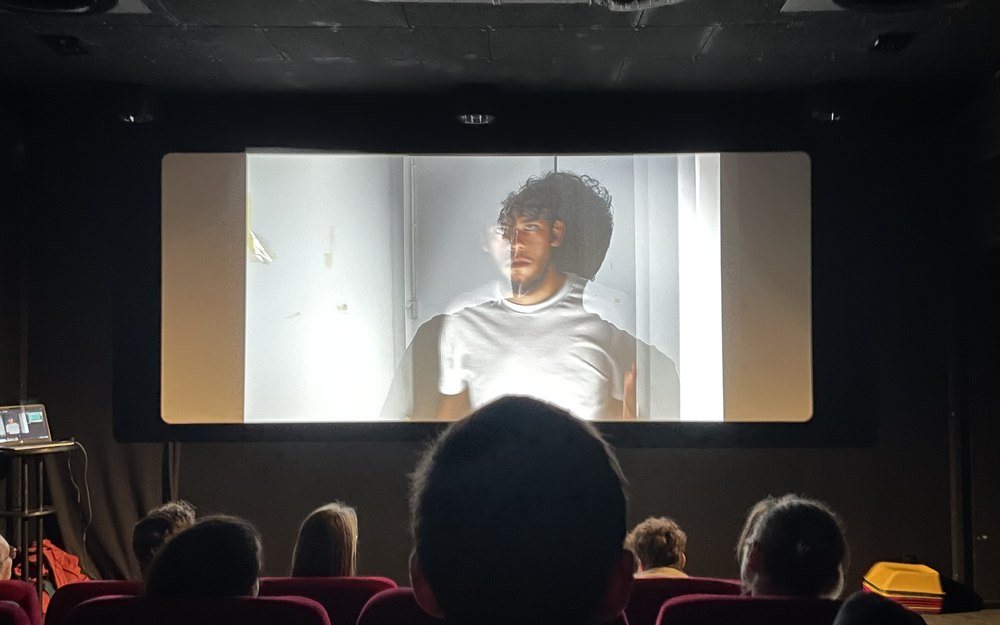
We showed the films in a cinema, the whole class on one evening, the first films any of us had made. Watching something you cut on a laptop land in a dark room full of people is a different kind of test, and it is the one that tells you whether the order you chose actually works.

The premiere evening.

Two photographs of the premiere evening in the cinema

Trolley problem.

An ethics thought experiment, animated in under a minute.

Year
2021 – 2022
Type
Study project, fourth year
My role
Concept and animation, in a pair
Length
52 seconds

In short

The problem
Explain an ethical dilemma without telling the viewer what to think.
My role
Concept and animation, in a pair, in Adobe Animate.
The result
A 52-second animation in which both choices carry the same weight.

The assignment

Explain a dilemma without answering it.

The trolley problem asks you to choose between doing nothing, which lets five people die, and intervening to switch the tram to a side track, which kills one person who would otherwise have been fine. There is no clean answer, and that is the point of it.

We had to turn that into an animated video, in a pair. The difficulty is not the animation. It is that the moment you explain a dilemma badly, the viewer stops weighing it and starts waiting to be told what to think.

The result

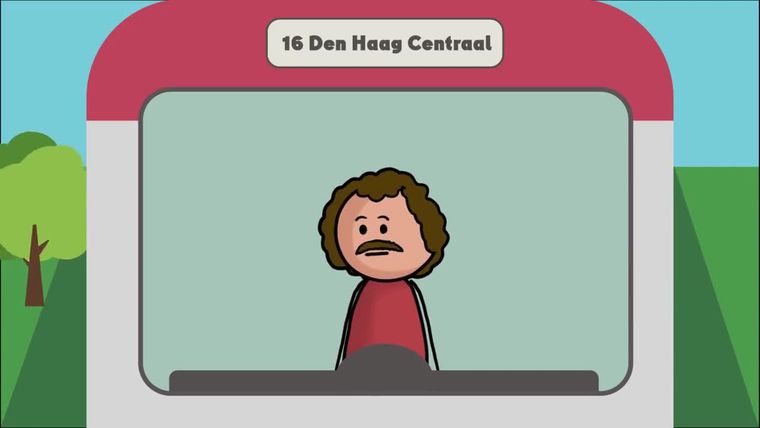
A tram driver on line 16, and a choice with no good way out.

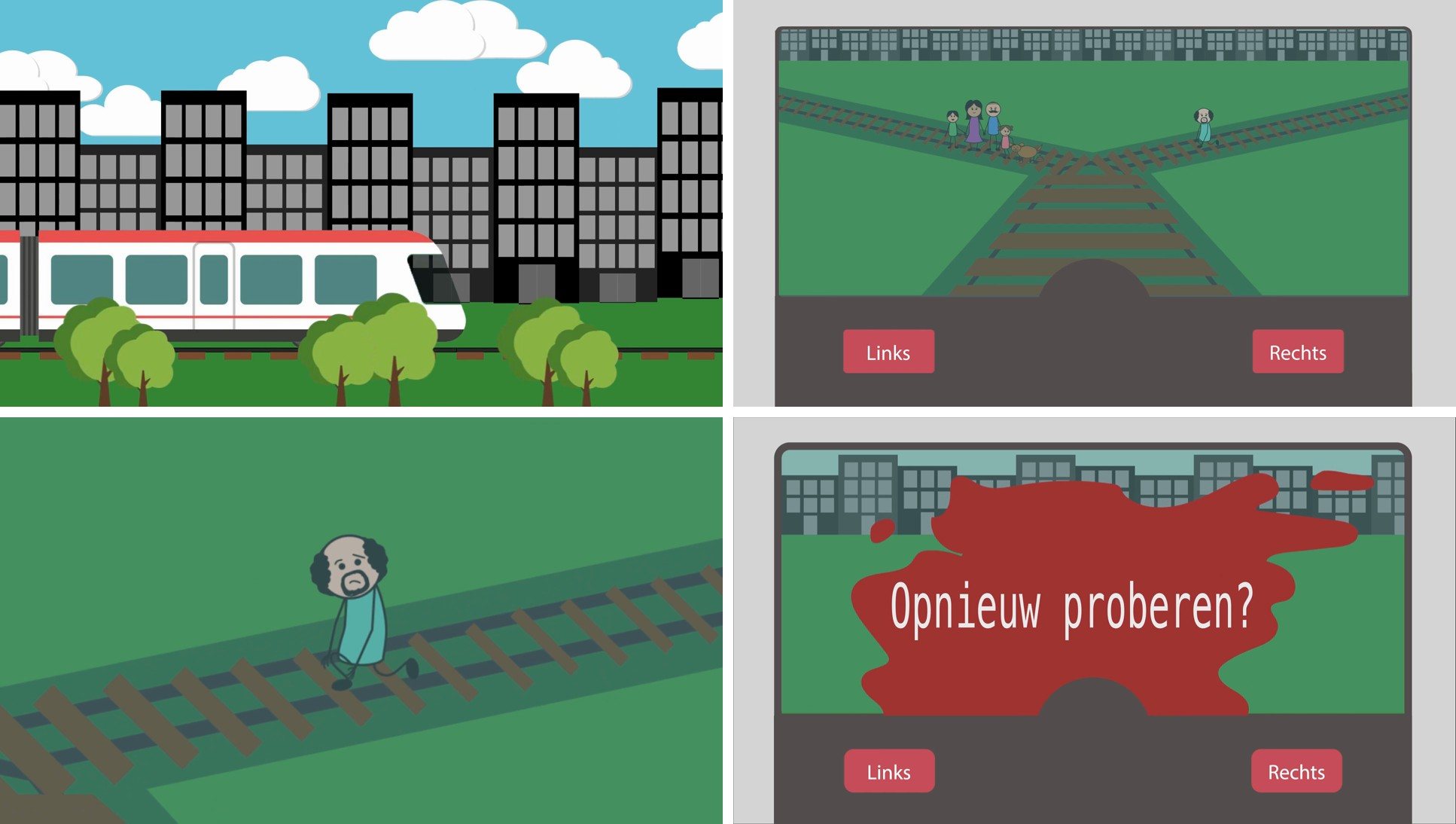
We wrote the scenario together, and the work went into making both sides genuinely hard. A tram driver in The Hague sees two tracks ahead of him. On one track a family is walking with their dog. They are not stuck: if they look up in time they can step off themselves. On the other track stands a man whose shoelace is caught in the rails. He has seen the tram. He cannot get away.

So the choice is not between numbers. It is between a group who might save themselves and one person who certainly cannot. That was the point: as soon as one option is obviously the right one, the viewer stops thinking and the film is over.

Making it

Animation turned out to be a technical craft, not a creative one.

We animated it in Adobe Animate, and it was harder than either of us expected. Getting every element to move the way you pictured it is a technical skill before it is a creative one, and we are both the creative half of that pair.

So we made a decision early: keep the moving parts as simple as we could get away with. Flat shapes, short movements, no detail that had to be rigged. Every hour we did not spend fighting the software went into the story instead, which is the part that had to carry the piece anyway.

It is the same call I make now when a prototype needs to answer a question. Build the least that will let you judge the thing you are actually unsure about.

Frames from the film

Four frames from the finished animation: the tram arriving through the city, the moment of choice with a Links and a Rechts button, the man on the track, and the question at the end that asks whether you want to try again. Flat shapes and short movements, as planned.

Four frames from the trolley problem animation: the tram in the city, the choice between left and right, the man on the track, and the try again screen

Fun facts

Four things about the way it was made.

Length

Fifty-two seconds, first frame to last.

Tool

Adobe Animate, and the software fought back harder than the idea did.

The pair

Concept, scenario and animation, made by two of us together.

The setting

A tram on line 16 in The Hague, not an abstract track.

What I took from it

Making something fair is harder than making it clear.

Both outcomes had to be given the same weight, in the same tone, with the same amount of screen time. The second you give one side the better framing, you have answered the question for the viewer and the piece stops working.

That constraint turns up at work more than I expected. Presenting two options to a team, writing the copy for a choice a user has to make, laying out a trade-off: the job is to leave the decision where it belongs.

Young voters.

One in five does not vote. We went to find out why.

Year
2021 – 2022
Type
Service design, study project
My role
Research and concept, in a team of five
Client
Digicampus

In short

The problem
Around one in five people between 18 and 24 does not vote, many of them in lower vocational education who feel they know too little.
My role
Research and concept, in a team of five, for Digicampus.
The result
The GovTech concept. Testing showed the jump from TikTok to YouTube was the weak link, so the clips were redesigned. A concept study, never built.

The assignment

A fifth of young voters stay home, and almost nobody had asked them why.

A service design project for Digicampus, the partnership that works on public services in the Netherlands. We chose our own life event and our own problem inside it. Ours: around one in five people between eighteen and twenty-four does not vote, and a large share of them are young people in lower vocational education who say they do not know enough about politics to choose.

The goal we wrote down was to inform eighteen to twenty-four year olds in mavo and mbo who are not voting about the parties, so they are motivated to vote on purpose.

That wording was deliberate. We were not trying to move anyone towards a party. What counted as success was whether somebody could make an informed choice, not which choice they made. In a project about politics that line has to be drawn before you start designing, not after.

Taking the problem apart

We pulled the problem apart with who, what, where, why, when and how before going anywhere near a solution. The useful part was the why, because four separate causes sat underneath one symptom: too little information about the parties, too much information arriving at once, voting guides returning answers that did not fit, and the belief that one vote changes nothing anyway.

Each of those became a How Might We question, which is how a problem turns into something a team can brainstorm against. How might we inform this group interactively so they know what fits them. How might we make them understand that their vote has an effect. How might we raise an interest in politics that lasts past one election.

The research

It was never apathy. It was a subject that never came up.

Desk research set the size of it. National statistics put interest in politics at four in ten young people, and only thirty-two per cent in the fifteen to eighteen bracket, rising to forty per cent between eighteen and twenty-five. Low, and lowest exactly where we were looking.

Then we each interviewed someone from the target group, so the conclusions came from people rather than from percentages. We also ran a stakeholder analysis, an empathy map and a dark side method session, which is the one where you deliberately design the worst version of your idea so you can see what to avoid.

What came back was not that these people do not care. Several of them said plainly that voting is how a democracy works and that they understood the point of it. What they did not have was a reason to look into it: politics never comes up among their friends, their parents do not push, and the language of it is not theirs. One of the people I spoke to said she might vote if she knew more about politics.

The Venn diagram that settled it

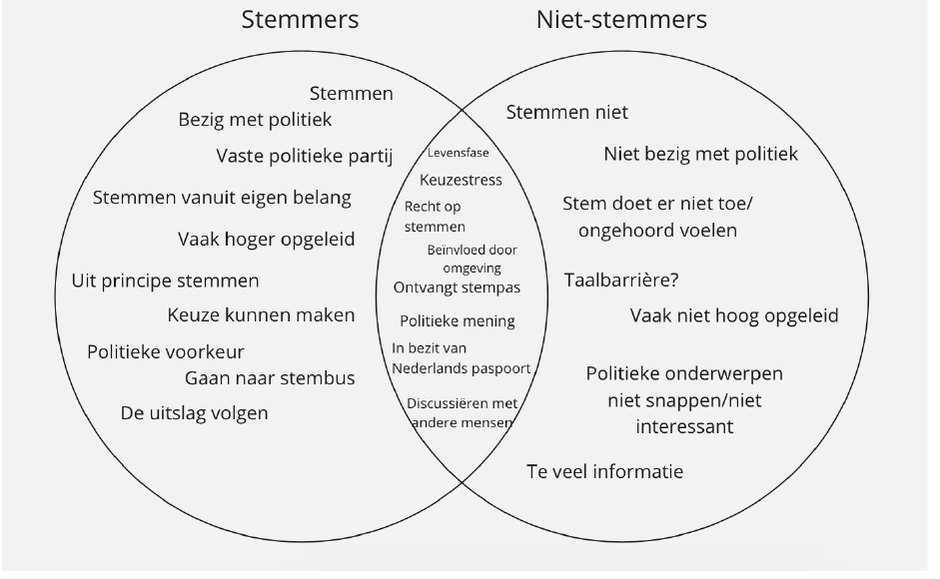
We mapped voters against non-voters and looked hard at what the two groups share. Both are in the same life stage, both have the right to vote, both feel the stress of having to choose, both are influenced by the people around them and both can talk politics with others. The difference sits on the non-voter side: not being engaged with politics, feeling your vote does not count, not understanding or not being interested in political topics, and too much information.

That is what made the brief concrete. The two groups are not different kinds of people, so the job was not to convince anyone. It was to make politics easier to approach for someone who is not engaged with it yet.

A Venn diagram of voters and non-voters. The overlap holds life stage, choice stress, the right to vote and influence from surroundings, and the non-voter side holds barriers such as too much information

The concept

Meet the politician before you meet the politics.

Three concepts went into a choice matrix and were scored from one to ten on nine criteria, among them whether it is open to everyone, can be done with other people, gives enough information, suits both inexperienced and experienced users, is current, and keeps a history of what you have already seen. The influencer concept scored 71 and the miniseries concept 69, with the third on 61, so we merged the two highest.

What came out is GovTech: a mini-series in which an influencer the group already follows spends a day with a party leader. Football, groceries, a kebab, and somewhere in the middle of that what the party actually stands for. The familiar face buys the attention, and the politics arrives once somebody is already watching.

Two platforms with two jobs. YouTube carries the full episodes, chosen over a streaming service because it is free and a subscription would quietly exclude part of the group we were designing for. TikTok carries the clips that make somebody curious enough to go and watch, with the channel link in the bio so getting there is one tap.

A different influencer every episode, because the reach should not depend on one person being liked.

The storyboard

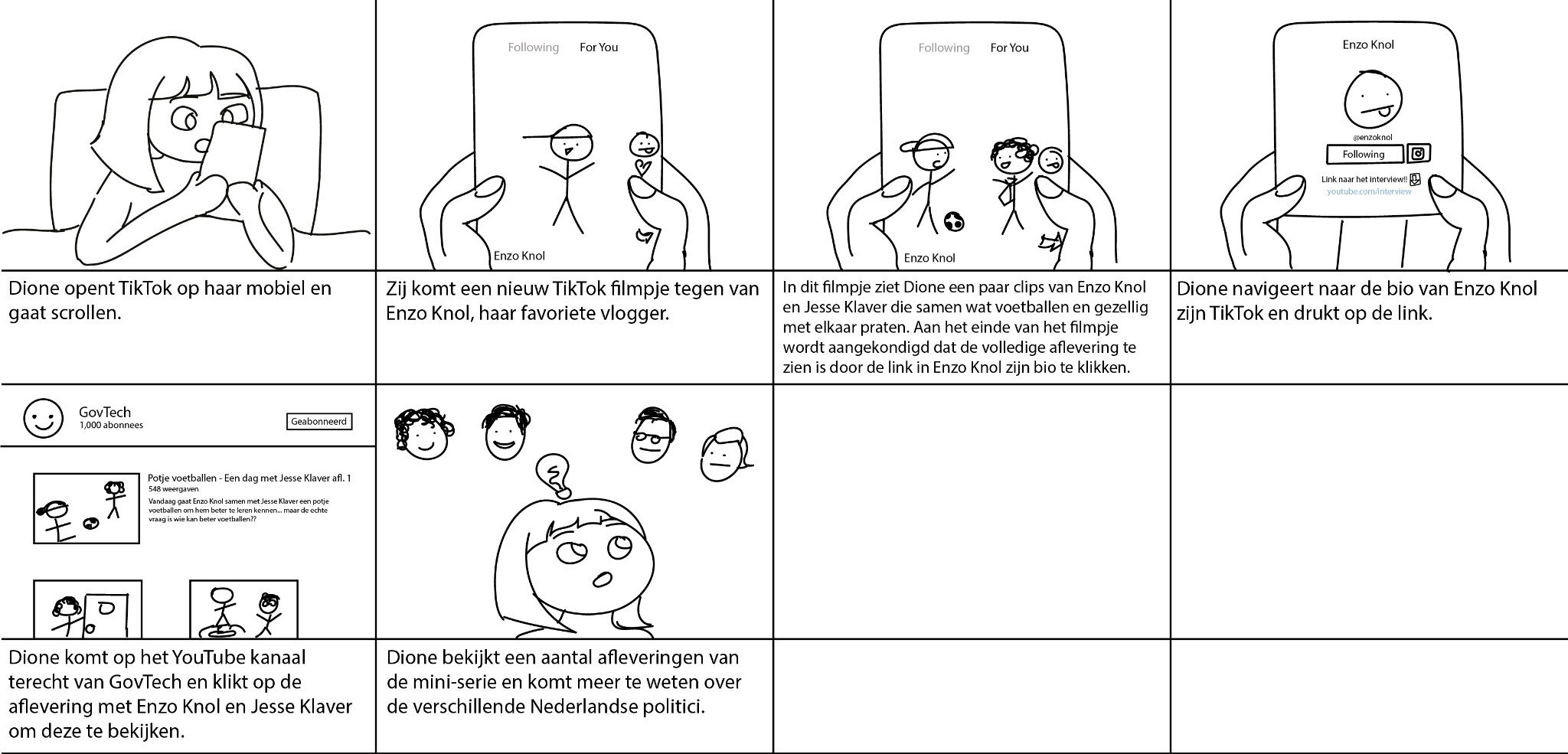
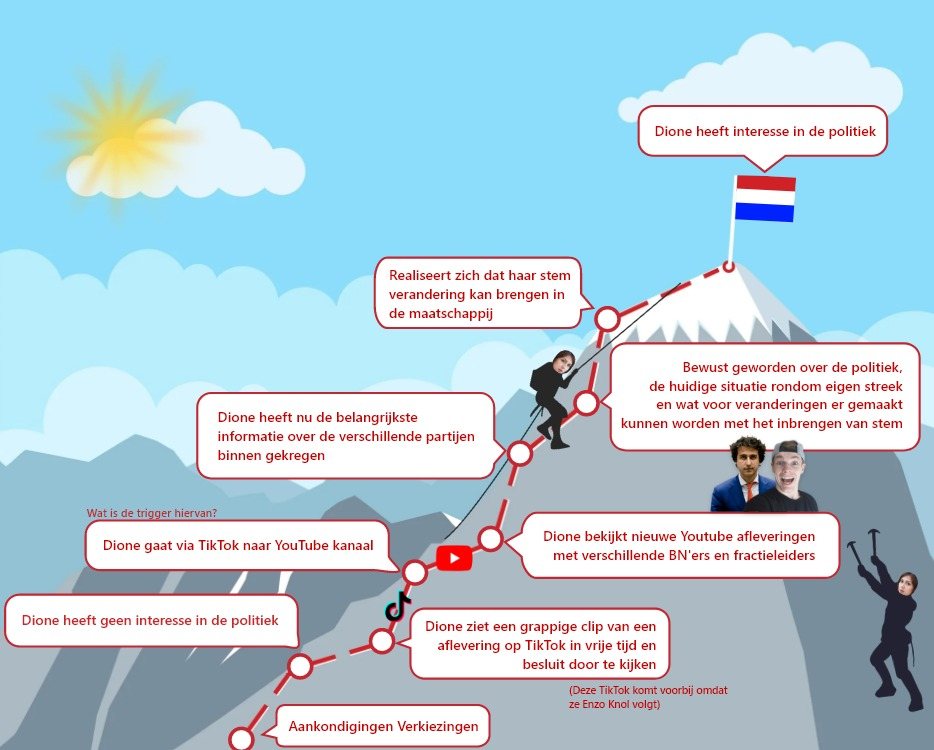
We used a storyboard to make the concept readable and to test it with the target group, MBO students between 18 and 24 who do not vote. It follows our persona Dione: she scrolls TikTok, comes across a clip of her favourite vlogger with a party leader, taps the link in his bio, lands on the GovTech YouTube channel and watches several episodes.

The idea behind it is edutainment. Politics is mixed with entertainment so the group watches first and learns along the way. Because every panel is a step somebody has to actually take, the user could walk through the concept visually while we asked about it.

The storyboard: Dione scrolls TikTok, taps the link in the bio, lands on the GovTech YouTube channel and watches several episodes

The desktop walkthrough

After choosing the concept we laid it out as a desktop walkthrough, built from the persona and a customer journey. The first version went to our teachers for feedback. They told us to look at what happens in the background as well, to be concrete about what the service is and how it works, and to take feelings into account, because someone with no interest in politics simply stops.

The biggest change was the end point. Voting is not what the concept is for, so the route now ends with Dione being interested in politics. We also moved the start to the announcement of the elections, because that is when the subject reaches people who were not looking for it. One open question stayed on the route on purpose: what makes her switch from TikTok to YouTube?

The second version of the desktop walkthrough, drawn as a mountain climb from the election announcement to being interested in politics

How it would look

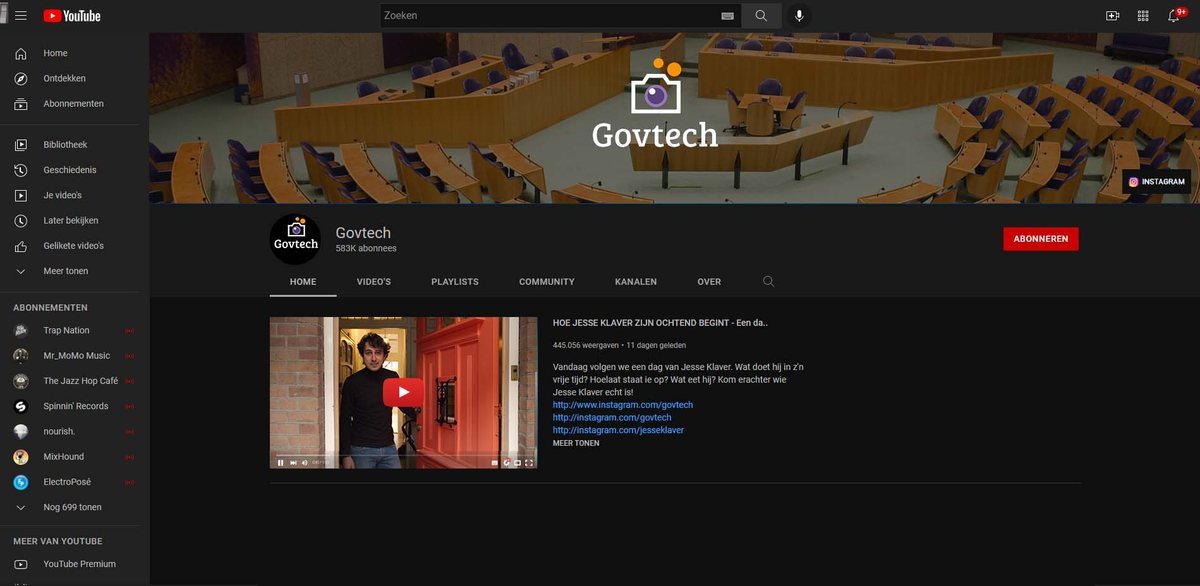
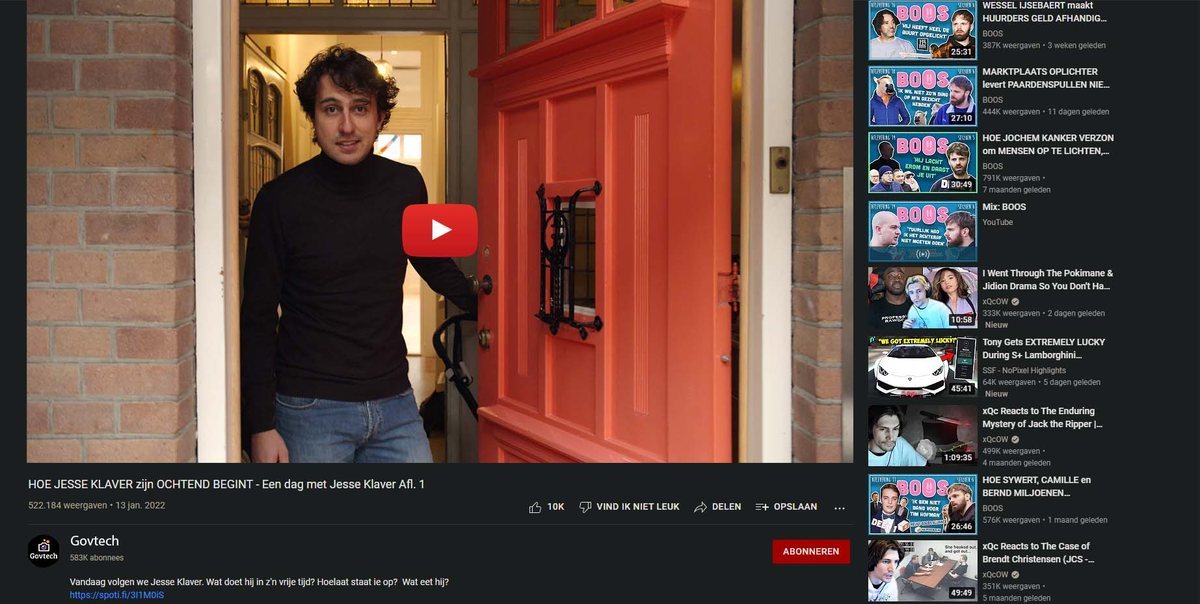
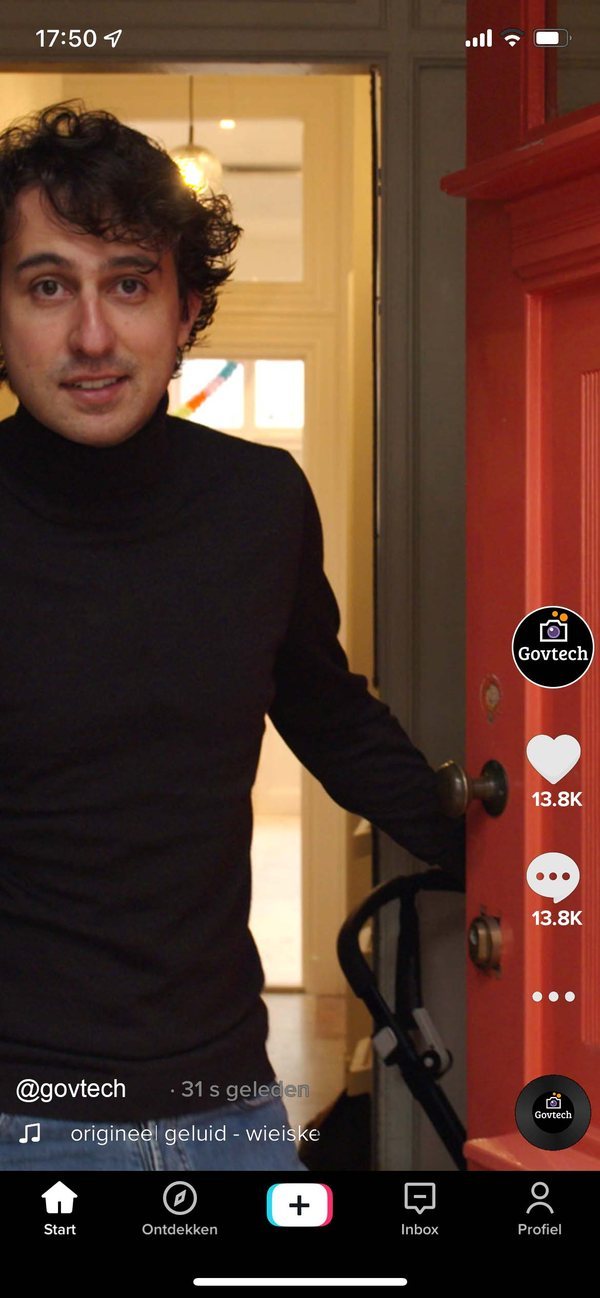
We mocked the concept up on both platforms so it could be judged as something real rather than as a description: the channel, a full episode, and the TikTok clip pointing at it.

These are concept visuals from a study project. The channel does not exist, the series was never made, and the numbers in them are illustrative.

Concept visual of the GovTech YouTube channel

Testing it

The test found the weak link, which is what a test is for.

We walked two people through the storyboard and the visuals and then asked about their own behaviour rather than their opinion of our idea. What do you do on TikTok, how long, and what makes you leave it for somewhere else.

Both spend between one and three hours a day scrolling. Both said that when a creator interests them they go to the profile and sometimes on to Instagram, but hardly ever to a YouTube channel. The second explained that he does look at those channels, but usually does not find what he came for.

That is the hinge of the entire concept, and it does not hold on its own. The whole thing depends on somebody making one jump between platforms, and the test said that jump is the least likely thing in the chain.

So the fix went into the clips rather than into the idea. Cut the most striking moment, edit it in the style that influencer’s followers already expect so it does not read as an advert, and stop before the ending so the only way to find out how it goes is the full episode. And on the official account, link only to YouTube. One clear route to the full episodes.

What I would say about this test. Two participants is not enough to conclude anything with, and one of them came from our own project group. I read the result as a signal worth designing against, not as proof. Saying that out loud is part of the work.

What I took from it

Go to where people already are.

The instinct in a project like this is to build a better voting guide. The research said the opposite. Another tool asks people to come to politics, and the one thing we knew for certain is that they will not. So the concept goes to them, in a feed they are already scrolling, through somebody they already trust.

The second thing is the value of testing the route rather than the idea. Our concept was coherent all the way through and still broke at one specific join, and we only saw it because we asked two people what they do instead of what they think.

And the honest limit: we never built it. This was a concept study, so what I can show is the reasoning and the artefacts behind it, not a measured result. I would rather say that than dress it up as something it was not.

The concept on both platforms: the full episode on YouTube, and the clip on TikTok that is supposed to get somebody there. Concept visuals, never published.

Concept visual of a full episode on the GovTech YouTube channel
Concept visual of the TikTok clip pointing at the episode

Error 404 · Page not found

Oops, moe...

Moemoe wandered off into the meadow with this page.

Case studies.

Projects from my studies, written up in full.

From my studies

Case studies from my student years.

Say hi.

A role, a project, or just a good chat over a dirty chai latte.

Get in touch

Three ways in, all of them easy.

Email moemoemalou@gmail.com

Best for anything with a bit of detail. Write as much or as little as you like, context helps.

LinkedIn Malou Hermans

Best for a quick hello, or if you would rather look through where I have worked before writing anything.

In person Somewhere with coffee

I am in the Netherlands and happy to meet. A call, a coffee, or a walk, whichever suits you best.

How I work

What you get if you bring me on board.

Research first

I would rather spend a week working out what better means than guess at it and redesign twice.

Accessible by default

Certified in accessibility, and I hold a design to WCAG 2.2 AA while I am drawing it, not afterwards.

Complex subjects

Dense products for expert users are what I do all day. I am not scared of a difficult domain.

Honest about trade-offs

If something is an assumption rather than a finding, I will say so before we build on it.

The honest bit

What I am looking for.

The roleMedior UX/UI designer
The kind of teamInformal, more like friends
Based inThe Netherlands
Working styleHybrid, preferably
LanguagesDutch and English
Bring me in forA creative platform or project

StarNails.

A website so hard to use that customers just phoned instead.

Years
2021 – 2022
Type
Study project, real client
My role
Solo, all four phases
Duration
Half a year

In short

The problem
Customers could not find prices, opening hours or how to book on a website from 2015, so they phoned the owner during treatments.
My role
Solo, through all four design phases, for half a year. A study project with a real client.
The result
The same three tasks, measured three times. Prices went from 1:00 to 13 seconds, opening hours from 1:28 to 5 seconds, booking from 1:45 to 25 seconds.

The assignment

The website was costing her working hours.

StarNails is a nail and hair removal studio, run by one person. Her website was built in 2015 and had not moved with the times, and her customers could not find things on it.

So they phoned her instead. During treatments, with a client in the chair. She was being interrupted all day to answer questions her own website already contained, and her traffic figures showed almost nobody was using the site at all.

That is what the assignment actually was. Not a prettier website: fewer interruptions. The goal I wrote down was to raise the efficiency of the site so existing customers could find the right information, so that she could spend her day on the work she is paid for.

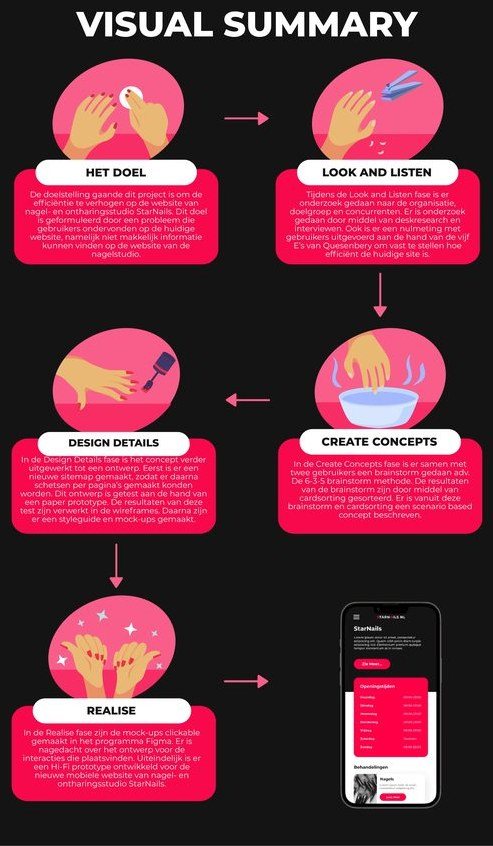
Visual summary

The project ran in five phases. Work out what the problem really was, then look and listen, which is the research: the studio, the customers, the competitors, and a baseline measurement of the old site. Then build concepts with users rather than for them, work the chosen one out into a design, and finally make it clickable and test it.

I put that whole route on a single page at the end, because a client is not going to read a report and this is still the quickest way to see what happened and in what order. You can open the visual summary here.

The visual summary of the StarNails project, five phases on one page

Making it measurable

I would not design until I knew what “better” meant.

“More efficient” is not a target. It is a mood. So before designing anything I defined it. The dictionary only offers synonyms, so I took a definition that could be counted: achieving as much as possible with as few means as possible. For this project that became the number of actions a customer needs, and the time it takes them, to reach what they came for.

To measure it I used Quesenbery’s five E’s, a model that breaks usability into five things you can check separately, and picked two of them deliberately: efficient and effective. Quesenbery defines efficient as how fast something is completed, which on its own is too narrow for the definition above, so I added effective, which is how completely and accurately the goal is reached. Speed without completion is not a result.

Then I took a baseline, which just means measuring the old site properly before changing anything, so there is something honest to compare against later. Three current customers, three timed tasks on the live website, thinking out loud while I observed and noted missed information, mistakes and hesitations. Find the prices. Find the opening hours. Make an appointment.

What the baseline showed. There was no Prices item in the menu, so prices had to be hunted for inside treatment pages. The opening hours lived in a dropdown item that could not be clicked and disappeared when you scrolled, and two of the three customers concluded the information simply was not on the site and gave up. The third found it buried in a block of text. Making an appointment led to the contact form, and nobody was sure whether they had actually booked anything.

Average times: one minute for the prices, one minute twenty-eight for the opening hours, one minute forty-five for an appointment. I mapped it as a customer journey, and the line only goes down.

Choosing what to build

Four ideas, and the interesting part is the three I threw away.

I ran a 6-3-5 brainstorm, a format where people write ideas down in short silent rounds instead of talking over each other, originally planned as a session with the owner. She went on holiday, which would have cost me a week, so I ran it with two of the customers from the baseline test instead. They had just experienced every problem on the site first-hand, which turned out to be a better qualification than I expected.

Sorting those ideas into groups, a technique called card sorting, produced four directions. Only one survived, and each rejection came from the research rather than from taste.

Rejected

Share the key information through Instagram

The two users in the session used Instagram a lot, so putting prices and opening hours in stories and highlights came up early. I dropped it: it requires an account and knowing how Instagram works, and this studio’s customers range from their twenties to their sixties. A solution that excludes part of the audience is not a solution.

Rejected

Build an informative app

An app with a clear menu would solve the navigation problem neatly. It also asks someone to download something first. The interviews had been explicit that these customers have very little time and want to look one thing up quickly, so a download reintroduces the exact barrier I was trying to remove.

Partly kept

Explain everything through video

An introduction video and videos explaining each treatment. Good for distinctiveness, bad as the main route to information: watching a video is slow, and these users came to check one fact. So the video stayed, as the second option on the About page, with the same information in text beside it.

Chosen

Rebuild the website around where people expect things

The ideas that survived all pointed the same way: decide where information belongs with a sitemap, give every clickable element a visible response so people know the site heard them, and offer more than one route to the same answer.

The decisions

The calls that shaped the design.

I wrote the concept up as a scenario: the persona walking through the new site step by step, so the idea could be judged as an experience instead of as a list of features. The owner approved it and I redesigned the structure. These are the calls that shaped it, and you can click through the finished prototype yourself.

The structure

A sitemap before a single screen

A sitemap is a map of every page on a site and how they sit inside each other, and that is where this redesign actually happened. All four treatments nested under one menu item instead of four separate ones. The vague “General” page, which the baseline showed was indistinguishable from the homepage, became an About page. Prices, which had been scattered across the treatment pages, got a page of their own. So did making an appointment, which until then had been the contact form, and the baseline showed that is exactly where people started doubting themselves.

The trade-off

The owner would not give up her diary

Users wanted to book online. The owner wanted to keep control of her own schedule and would not let customers pick a date and time themselves. My first design let them do exactly that, and she turned it down. The version we settled on asks for preferred parts of the day instead, with a plus button to add more, so she can find a slot that fits both. Neither side got what they first asked for, and both got what they needed.

The banner

Taking the photo out

Every page was going to open with a photo banner. In the mock-up stage I cut it. The photo gave the user no information and took up most of a phone screen, which means everyone has to scroll before they can read anything. The interviews said these people come to check one thing quickly. A banner would have made every one of them pay for a decoration.

A privacy fix

The Instagram page had to go

The old site had a page synced to the owner’s personal Instagram account, so her private photos appeared on her business site. I replaced it with a portfolio page: a timeline of her actual work, which does the job the page was meant to do in the first place.

The style guide

Keeping her colours, fixing the contrast

The hot pink had been the business’s look for years, so it stayed as the primary colour. The grey went, replaced with an off-black, because it gives the pink a much stronger contrast to sit against. Between us we dropped the cream. Button states got defined properly, because the competitor research had shown almost none of them used hover or active states, and that is how a site tells a user it heard them.

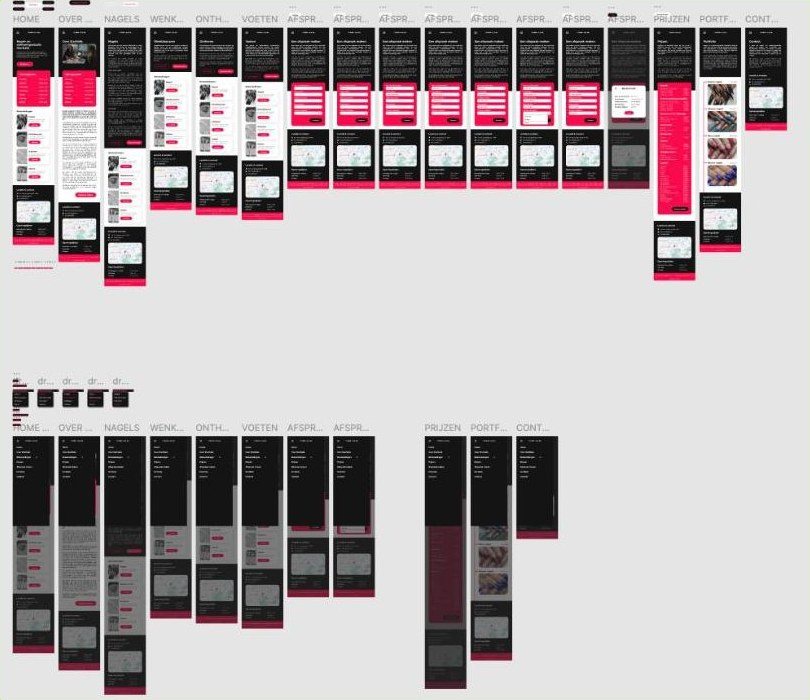
The artboard

All of it sits on one artboard: the wireframes underneath, the finished screens on top, so you can see which parts survived the testing in between. Every screen there went through the paper prototype first and was redrawn where a user got stuck.

The clickable version is the Hi-Fi prototype, and you can walk through it in Figma.

The full StarNails artboard with the colour designs above and the wireframes below

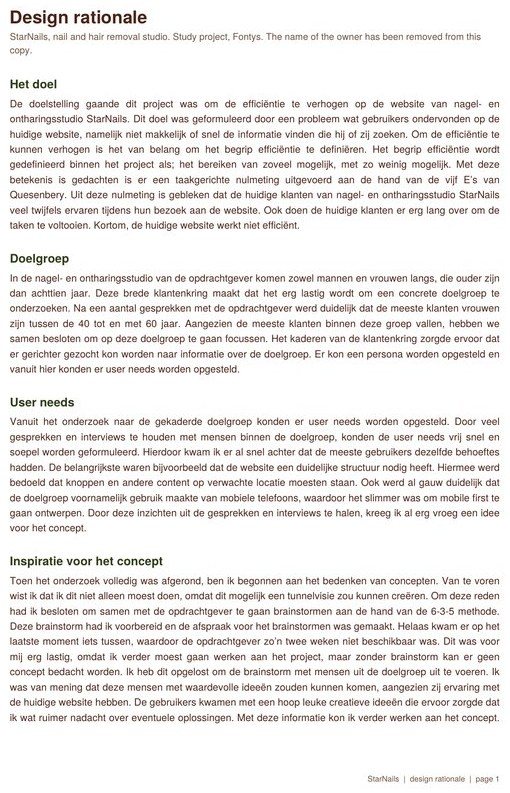
Design rationale

Every call above is argued out in the design rationale: who the audience turned out to be and why we narrowed it, where the user needs came from, how the concept was found, and what happened when the brainstorm with the owner fell through two weeks before I needed it.

It also covers the parts that did not go smoothly. The wireframes were quick, the mock-ups were not, because a whole house style still had to be decided: colours, type, sizes and button states. It is the document I would hand to someone who wants to know why this site looks like this, rather than what it looks like. You can read the full design rationale here.

The first page of the design rationale for StarNails

The result

The same three tasks, three times, measured.

I tested the paper prototype, a version drawn on paper that I operated by hand while the customer pointed at it, with three current customers using the identical tasks, the same observation schema and the same think-aloud method as the baseline. Then I did it again with the finished Hi-Fi prototype. Keeping all three tests identical was the whole point: it is the only way the numbers mean anything.

Opening hours went from a task two out of three people abandoned, to something all three found on the homepage without taking a single action.

1:28 to 0:05to find the opening hours
1:00 to 0:13to find the prices
1:45 to 0:25to book an appointment
TaskLive sitePaper prototypeHi-Fi prototype
Find the prices1:0021s13s
Find the opening hours1:2812s5s
Make an appointment1:4537s25s

The paper prototype test also earned its keep: one user expected the opening hours on the About page as well as the homepage, and two were confused by the Cancel and Back buttons on the booking confirmation. Both went into the next round. A cheap prototype found them before anything was built.

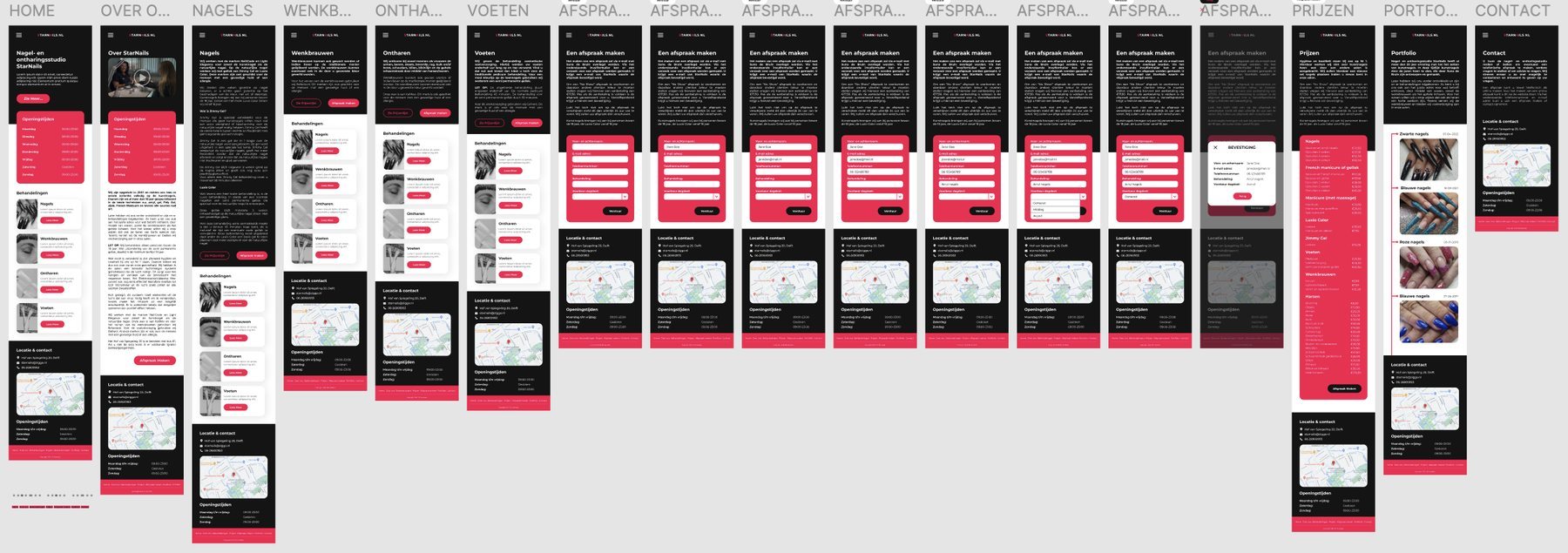
What I would keep from this project: defining the measure before designing. It cost me a week at the start and it is the only reason I can tell you this worked rather than that I think it looks better.

Every screen in the Hi-Fi prototype. The opening hours sit high on the home page instead of in the footer, prices and booking each have a page of their own, and the Instagram feed became a portfolio.

All the StarNails screens: home, treatments, booking, prices, portfolio and contact

Alphatax.

Designing Pillar2, a compliance tool for people who are already the experts.

Since
May 2024
Project
Pillar2, B2B SaaS
My role
Junior → Medior UX/UI Designer
Team
UX team of three, and growing

In short

The problem
Tax specialists file complex returns in a domain full of legislation, and they know their field far better than the tool does.
My role
Junior to medior UX/UI designer in a UX team of three, and growing. I worked on the new workflow, local filings and the kanban and list views, and built AI skills for copy, tickets and testing.
The result
Pillar2 grew from a small workflow into a complete, end-to-end filing workflow.

My part

I worked on the new workflow of the tool, in which we introduced a new flow. I helped add local filings, and I helped design the kanban board view and the list view. These screens show what the tool does. The detail of the design work belongs to Alphatax, so I would rather talk it through in a conversation than put it on a website.

The product

Software where a mistake costs the client dearly.

Alphatax builds Pillar2: a tool tax specialists use to file returns for multinational enterprises. I have worked on it as a designer since May 2024.

The work it supports is deadline work. During filing season specialists have to get compliance done for a group of companies spread across jurisdictions, and accuracy counts as much as speed. That is a different design problem from most software, where a mistake costs a user a few seconds.

On what I can show. I describe Pillar2 here at the level Alphatax describes it publicly. Internal process, customers and unreleased work stay out of it.

The users

They know the subject better than the software does.

The people using Pillar2 are tax specialists. They are not struggling with the domain. They are struggling with a tool that has to represent the domain faithfully and still be usable at eleven at night in the week of a deadline.

That changes what design is for. When the subject matter is dense and the user is already an expert, design is about understanding, not decoration. You cannot simplify the rules, because the rules are the product. What you can do is make the tool match how a specialist already thinks about the work, so the structure on screen is not one more thing to learn.

This audience is also hard to reach. There is little to no direct contact with the people who use the tool, so the knowledge has to come from the domain itself and the gaps get filled with assumptions. That is the part worth being honest about: an assumption is a risk, and the question is always whether what it buys you is worth taking it. We weigh that before building rather than finding out afterwards.

The tool

From a spreadsheet upload to a reviewed filing.

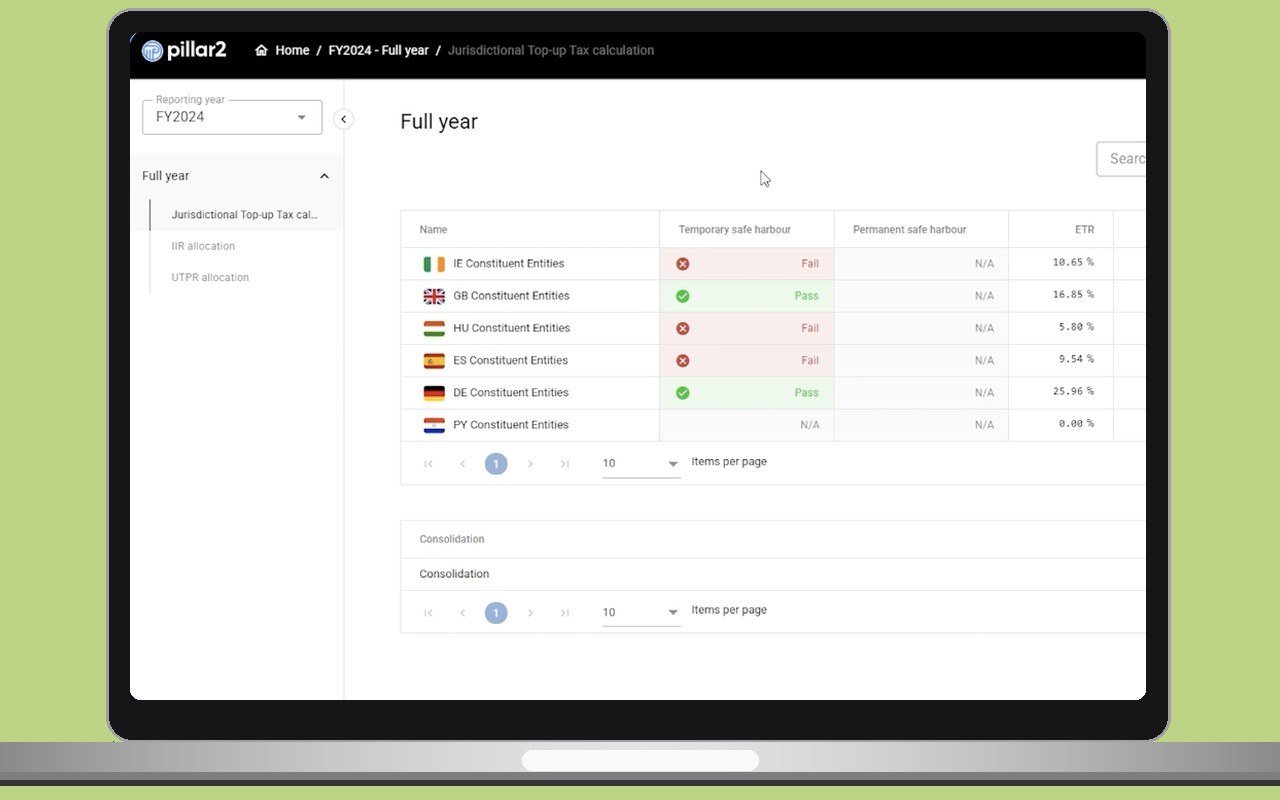
These are the public screens of Pillar2. Together they follow one filing: the data goes in, the calculation is worked through step by step, and a second person checks the result.

Getting the data in

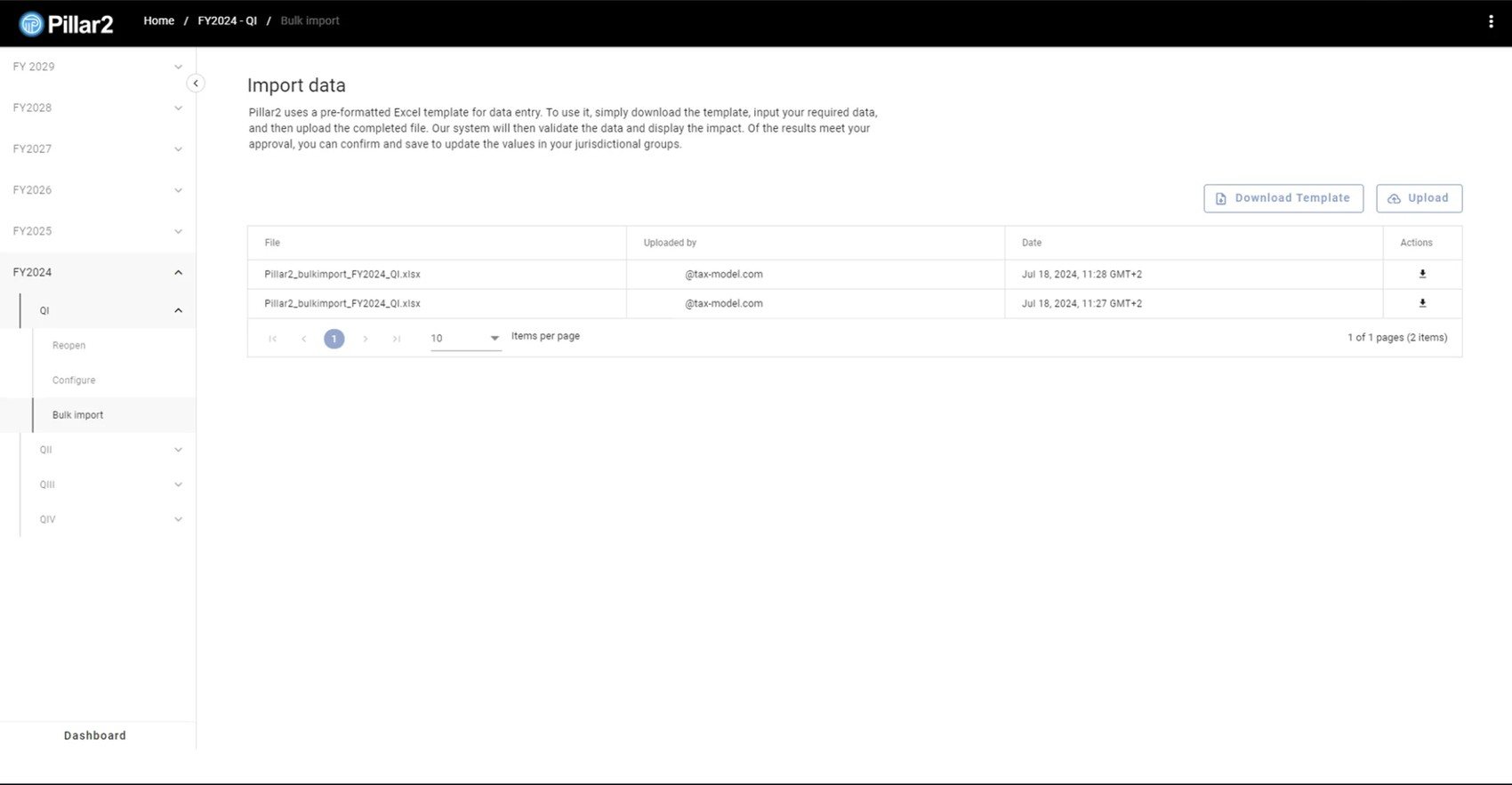
A filing starts with numbers that live in the group’s own accounts. Pillar2 takes them in through a pre-formatted Excel template: the specialist downloads the template, fills it in and uploads it. The system validates the data and shows the impact first, and only when the specialist agrees are the values saved to the jurisdictional groups.

Every upload stays listed with the file, who uploaded it and when, so there is always a trace of where the numbers came from.

Pillar2 import screen: download the Excel template, upload it, and see the list of earlier uploads

Working through the calculation

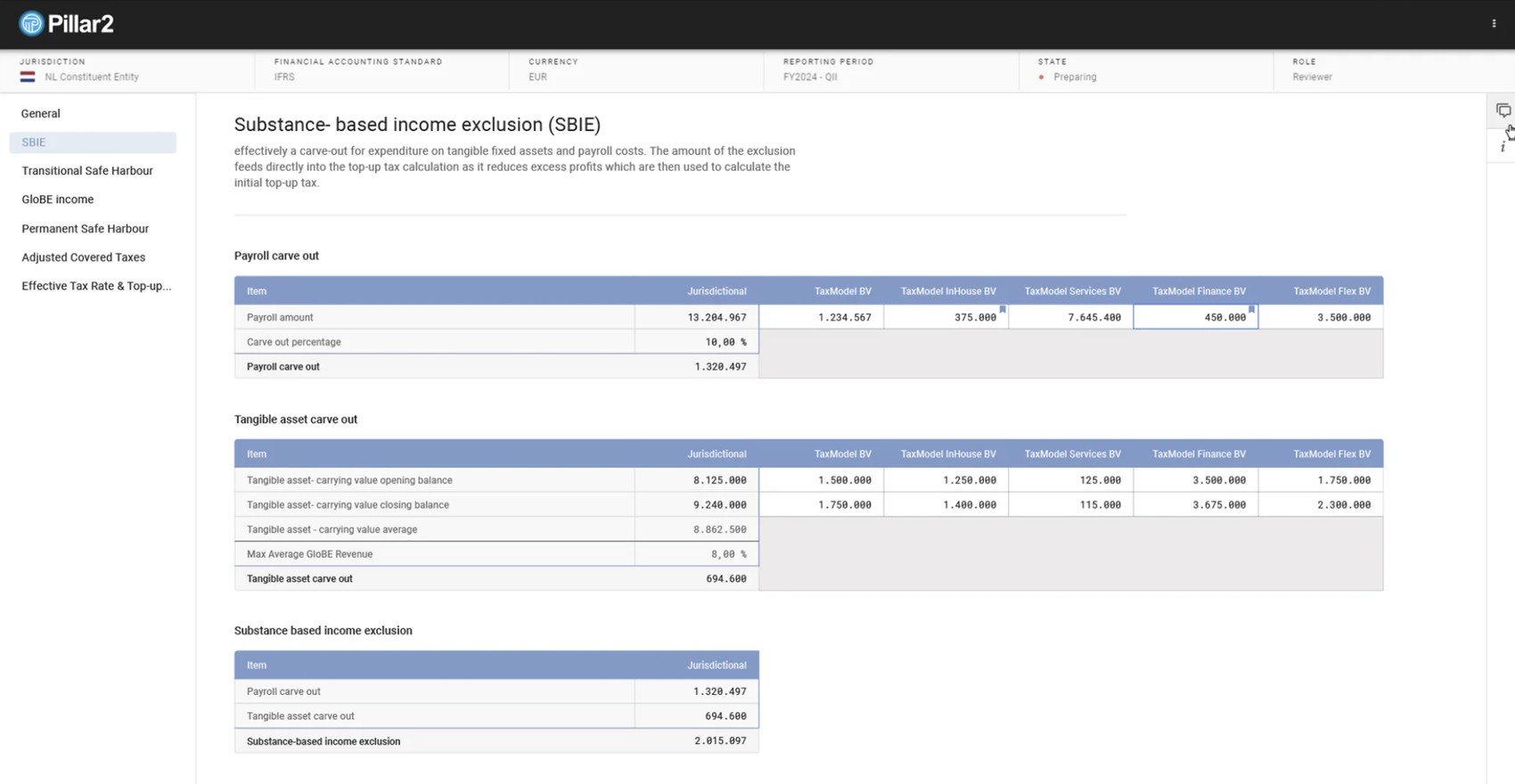
We split the calculation into steps on purpose. The menu on the left breaks it into manageable parts: general information, the substance-based income exclusion, the safe harbours, GloBE income, adjusted covered taxes, and finally the effective tax rate with the top-up tax. A specialist works on one part at a time with a clear goal, instead of facing the whole calculation at once and getting overwhelmed by what comes next.

Two UX principles sit behind that choice. Chunking and progressive disclosure: break complex information into smaller pieces and show only what the current step needs, so the cognitive load stays manageable. And consistency and standards, one of Nielsen’s ten usability heuristics: Pillar2 uses the same step-by-step pattern in several places, so once you have learned it, you know how the rest of the tool works.

The header keeps the context in view the whole time: jurisdiction, accounting standard, currency, reporting period, status and the role you are working in, so nobody has to remember where they are (recognition rather than recall). Each entity gets its own column next to the jurisdictional total, so the total and the entities behind it sit in one view.

Pillar2 substance-based income exclusion screen with a table per entity

From tax rate to top-up tax

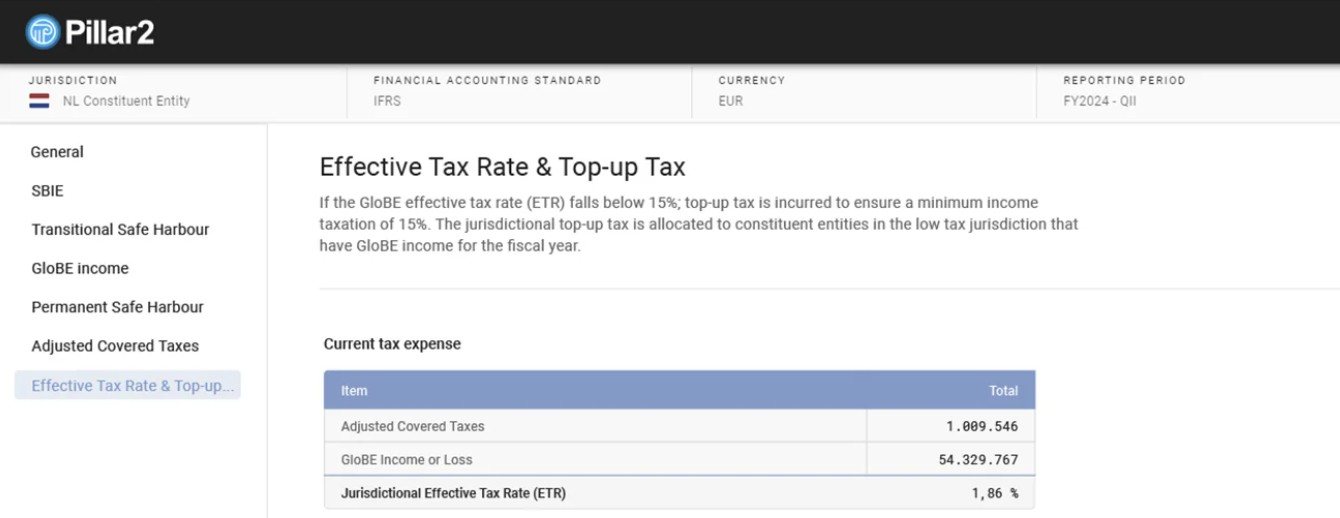
The last step turns the numbers into the answer. When the effective tax rate of a jurisdiction falls below 15 per cent, top-up tax is due to bring it up to that minimum. The page builds this up in the order a specialist would check it: current tax expense and the effective tax rate first, then the top-up rate.

Pillar2 effective tax rate and top-up tax screen, showing the current tax expense table

Checking each other’s work

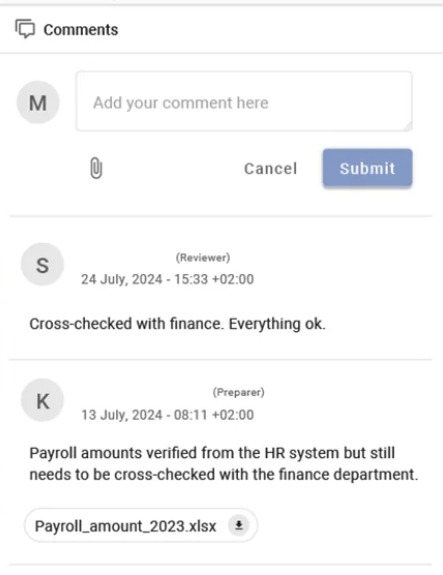
Filing is done by two roles: a preparer who fills it in and a reviewer who checks it. We designed the comments section so these roles build an audit trail of the data they enter. Comments sit in a panel next to the numbers they are about, and a supporting file can be attached. That way everyone working in the tool can understand a value, an adjustment or an input: who added it, why, and what it is based on. The names of the people in the comments are removed here.

The Pillar2 comments panel, with a reviewer note and a preparer note that has an attached file

How the work grew

From a small workflow to the whole thing.

I joined as a junior. Pillar2 was still in its early days and the UX team was two people. It is now three, and still growing.

It has since grown into a complete, end-to-end workflow, where specialists finish a filing from start to submission inside one tool.

That growth is the part of this job I would point at. A small team on a large tool with a lot of separate user flows means switching context quickly and picking up whatever design needs doing, rather than owning one corner of it. I went from junior to medior alongside the product.

Designing with AI

I also build some of the tools we design with. Working mostly with Claude, I made AI skills that take repetitive work off the team:

  • Copy. A skill that writes and reviews interface copy in the Pillar2 voice, from buttons and error messages to tooltips.
  • Tickets. A skill that turns plain-language bug notes into tickets in the team’s bug format.
  • Testing. Skills for testing functionality.

As the team grows, we are exploring Figma together with AI, and using that route to implement a token system.

What I take from it

Knowledge is part of the job.

The biggest lesson is about knowledge. Tax specialists know their field far better than the tool does, and I rarely get to sit with them. A general understanding of the tax rules is a must, even though it is dense and difficult material, and most of mine I built up while working on the tool itself. Where my knowledge stops, I am honest about the assumptions that fill the gaps. An assumption is a risk, and the question is always whether what it buys is worth taking it.

The second is accessibility as a habit. I take certificates alongside the work, and the accessibility one at the UX Design Institute, which I am still working on, already changes how I design: it taught me to hold a design to WCAG 2.2 AA while I am drawing it, instead of auditing it afterwards.

And the third is range. On a small team with a large tool, you pick up whatever design needs doing, and you switch between flows quickly. It is what took me from junior to medior in a short time.

H5mag.

Every question the site left unanswered came back as a phone call.

Years
2023 – 2024
Type
Graduation project
My role
Solo, research through tested prototype
Duration
Six months

In short

The problem
A website from 2014 did not explain the software, so visitors left without starting the trial and phoned the team instead.
My role
Solo graduation project, six months, from research to a tested Hi-Fi prototype.
The result
The research showed the missing stimulus was support. On the live site the test participant would have closed the page; on the prototype he got stuck nowhere.

The assignment

A website from 2014, and a phone that would not stop ringing.

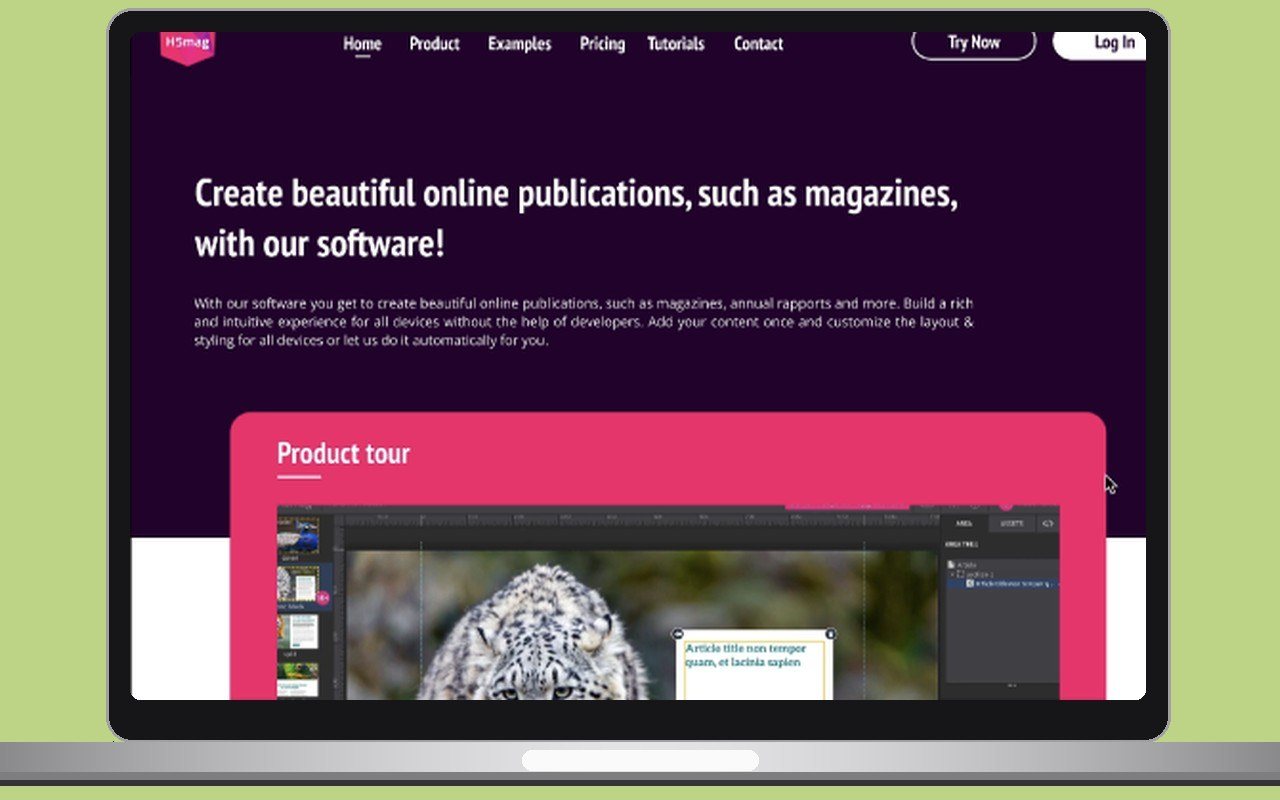
H5mag sells software for building online publications such as magazines. Their website dated from 2014 and had never been designed around the experience of using it. People arrived, did not work out what the software could do for them, and left without starting the trial.

Underneath that sat a business problem. Anyone who could not find an answer on the site phoned instead. H5mag had nobody employed to take those calls, so they pulled the owner and the rest of the team away from their own work. The customers liked the personal contact. It just does not scale: the more the customer base grows, the worse that gets.

My graduation assignment was to raise the experience of the website so that people stay, try the trial, and buy.

How I framed it

A hypothesis is not a brief. I turned it into something I could test.

My client had a hypothesis: the audience is missing some form of stimulus on the site, and that is why they do not carry on to buying. Designing against an assumption is how you end up solving a problem nobody has, so I rebuilt it as a question I could answer with evidence.

Main question: which stimulus is the audience missing on the website that would carry them through to using it and buying H5mag’s software?

Then I broke it down by asking myself one thing: which pieces of information am I missing in order to answer that? Six sub-questions came out of it, each with the technique that would answer it.

Two method choices. Designers work to process models, which are really just agreed names for the order you do things in. I chose the CMD circle, with its four phases of Look and Listen, Create Concepts, Design Details and Realise, over the better-known Double Diamond. I had used the Double Diamond before and found it gave me less to hold on to, because it works in fewer and broader phases. The CMD circle lets me put everything into one aspect of the process at a time without losing sight of the goal.

The second choice mattered more. Usability and experience are not the same thing, and this assignment was about experience. So I defined experience using Quesenbery’s five E’s, a model that splits that vague word into five things you can actually check, and tested specifically against engaging: how pleasant, interesting and satisfying someone finds the site. That gave me something to measure instead of an opinion to defend.

How does the website work right now?

A heuristic evaluation of every page and every clickable element.

What does H5mag itself need from the website?

Desk research into the organisation and conversations with the client.

Who are the most important stakeholders?

Desk research and two stakeholder interviews.

What difficulties does the audience run into on the current site?

Interviews and a baseline test of the live site.

What does the audience need from the website?

Interviews across both user groups and the same baseline test.

How do comparable companies motivate their audience?

Competitor research and a benchmark.

What I did

Evaluate, talk to people, and measure before changing anything.

Heuristic evaluation

I started by running Nielsen’s ten heuristics over every page and every clickable element on the site. Those heuristics are ten standard rules any interface is expected to meet, the sort of thing nobody notices when it works and everybody notices when it does not. The site failed four of them.

A note on that method. I ran the evaluation on my own, and I wrote the limitation into my report rather than around it: a heuristic evaluation measures usability, not experience, and a single evaluator finds fewer problems than several would. I kept it because it told me where to look, not what to conclude.

Interviews and personas

Then I spoke to people. Two stakeholders, four designers at design agencies, and five communication and marketing leads at organisations that publish their own titles. Two of them came back for follow-up conversations. Those two user groups stayed separate through the whole project, because their jobs are different and I did not want to average them into one imaginary user.

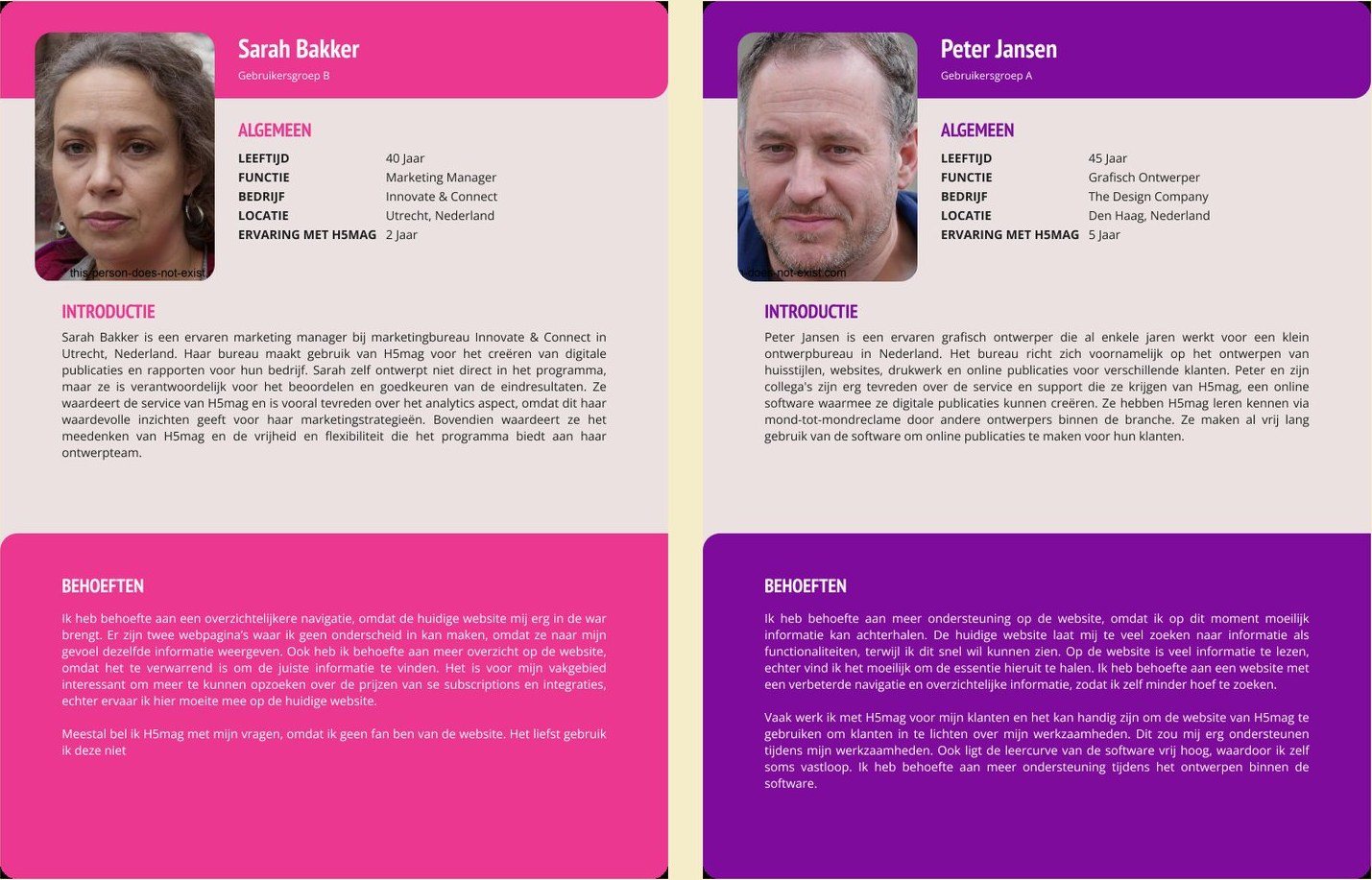
Out of those conversations came two personas, one per group, each built from what people actually said rather than from what the company assumed about them.

Two personas, one for each user group

Baseline test

And I measured the existing site before touching it. Two participants, one from each user group, worked through a four-task scenario while thinking out loud: find out what the software does, find the pricing and what it includes, find help with a function inside the trial, and find an example of a finished publication. I read the same scenario aloud to each of them so both tests started from identical ground.

That baseline was the point. I wanted something to compare the Lo-Fi and Hi-Fi prototypes against later, rather than asking people whether they liked the new one better.

Visibility of system status

Nothing responded to you

Magazine covers on the examples page did not react at all on hover, so they did not read as clickable. People did not know the site had registered them.

Consistency and standards

The menu changed once you logged in

Both the content and the layout of the menu bar changed after login, and a logged-in user could no longer browse the example magazines at all.

Aesthetic and minimalist design

Three text colours, no rule

Body text switched between dark blue and dark grey with no discernible reason, underneath purple headings. The effect is chaotic rather than decorative.

Match between system and the real world

Account, and also My Account

Two buttons with near-identical names, in different places, opening different things: one for licences and APIs, one a pop-up with personal details.

What I found

Both groups got stuck in the same place.

Both user groups hit the same wall. Pages did not return what their names promised, and Benefits and Features were impossible to tell apart. Group A got stuck on tasks one and three, group B on task three. One participant said plainly that if he had come to this site on his own, he would have closed it.

Underneath that, two more things. Information was spread thin and set in three columns of text on the features page, so nobody could scan it. And people expected interaction that was not there, right down to social icons that did not click.

The pricing page told them what it cost but not what they were getting for it. That is the exact moment one of these users has to justify the purchase to a manager, so it is the moment the sale is made or lost.

The answer to my main question turned out not to be a missing feature. The missing stimulus was support. H5mag did not support people while they were informing themselves about the software, and did not support them while they were learning to use it. The competitors I benchmarked did both, with interactive demonstrations of the product, tutorials and webinars.

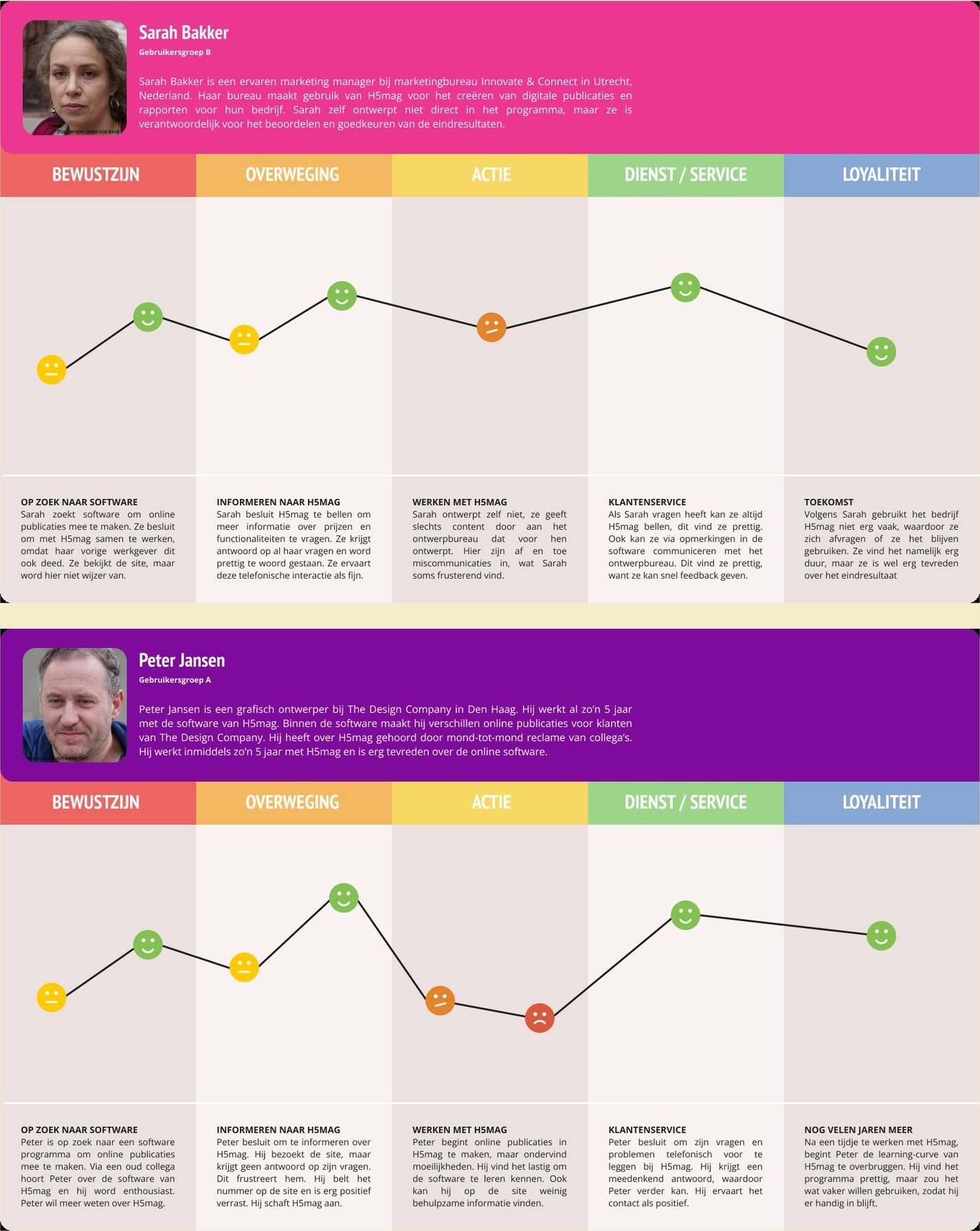
A customer journey for each group, mapped across awareness, consideration, use, service and loyalty. The dips are the moments where the site stopped helping them.

Two customer journeys showing the experience dropping at the same points

What I designed, and what it did

Every decision traceable to the thing that caused it.

Before I wrote a single requirement I wanted a wide pool of ideas. The research had said one thing clearly: people needed more support. So that need became the starting line.

Brainstorm

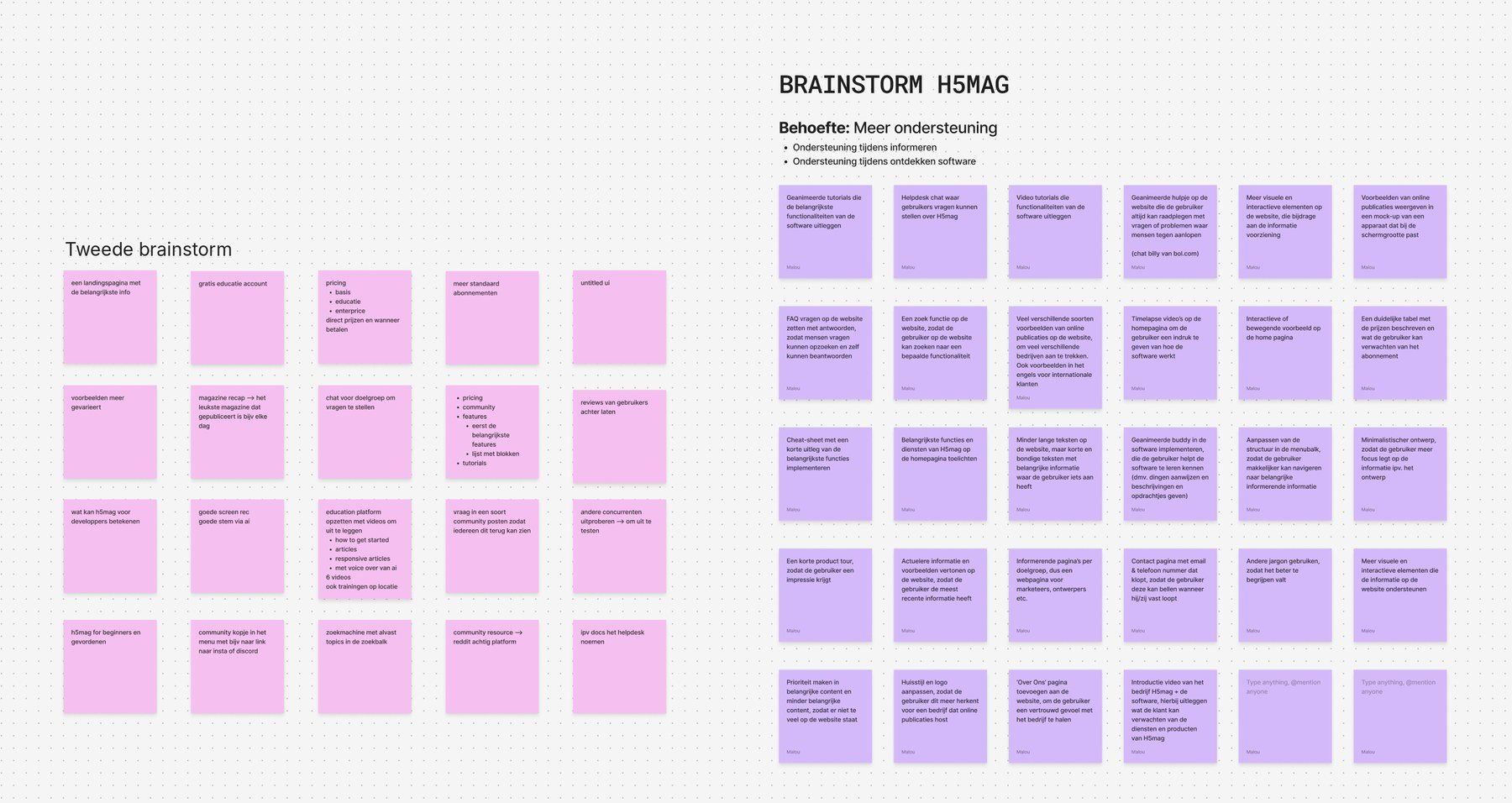
The brainstorm started from one need, more support, split into two moments: support while people inform themselves, and support while they discover the software. On my own I came up with 28 ideas, from animated tutorials and a helpdesk chat to a search function and a short product tour. A second brainstorm, with one other person, added another 20 from a different angle, such as a landing page with the key information, a free education account and a community.

Both brainstorms are on Figma: my own brainstorm board and the one we made together.

Two brainstorms about more support for H5mag users: 28 purple notes of mine and 20 pink notes from a second person

Card sorting, first round

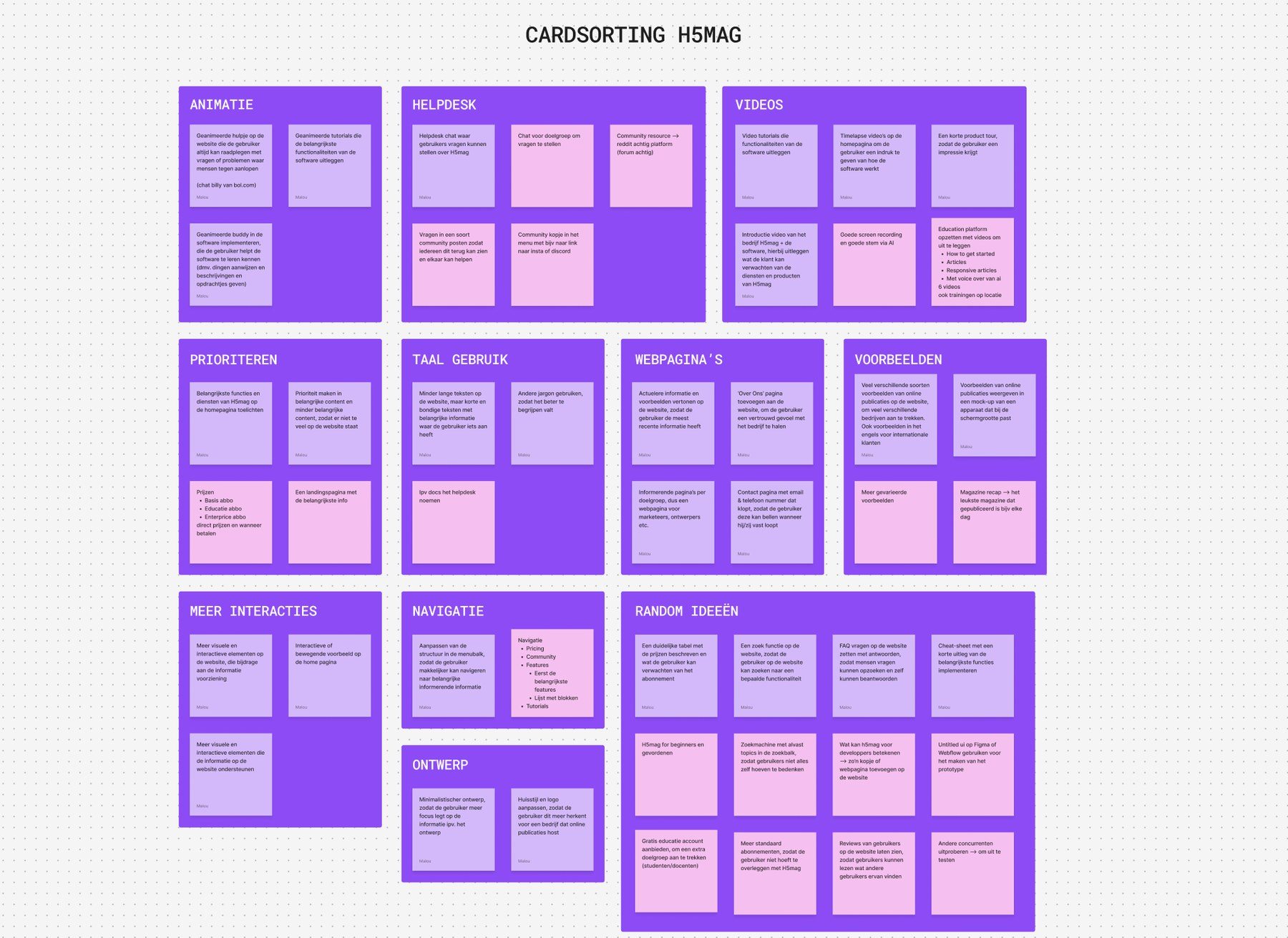
Then I sorted all of it. The first round gave eleven clusters: animation, helpdesk, videos, prioritising, language, web pages, examples, more interaction, navigation, design, and one for ideas that did not fit anywhere yet. My notes and the second person’s sit side by side in the same groups.

First card sort of the H5mag ideas in eleven clusters

Card sorting, second round

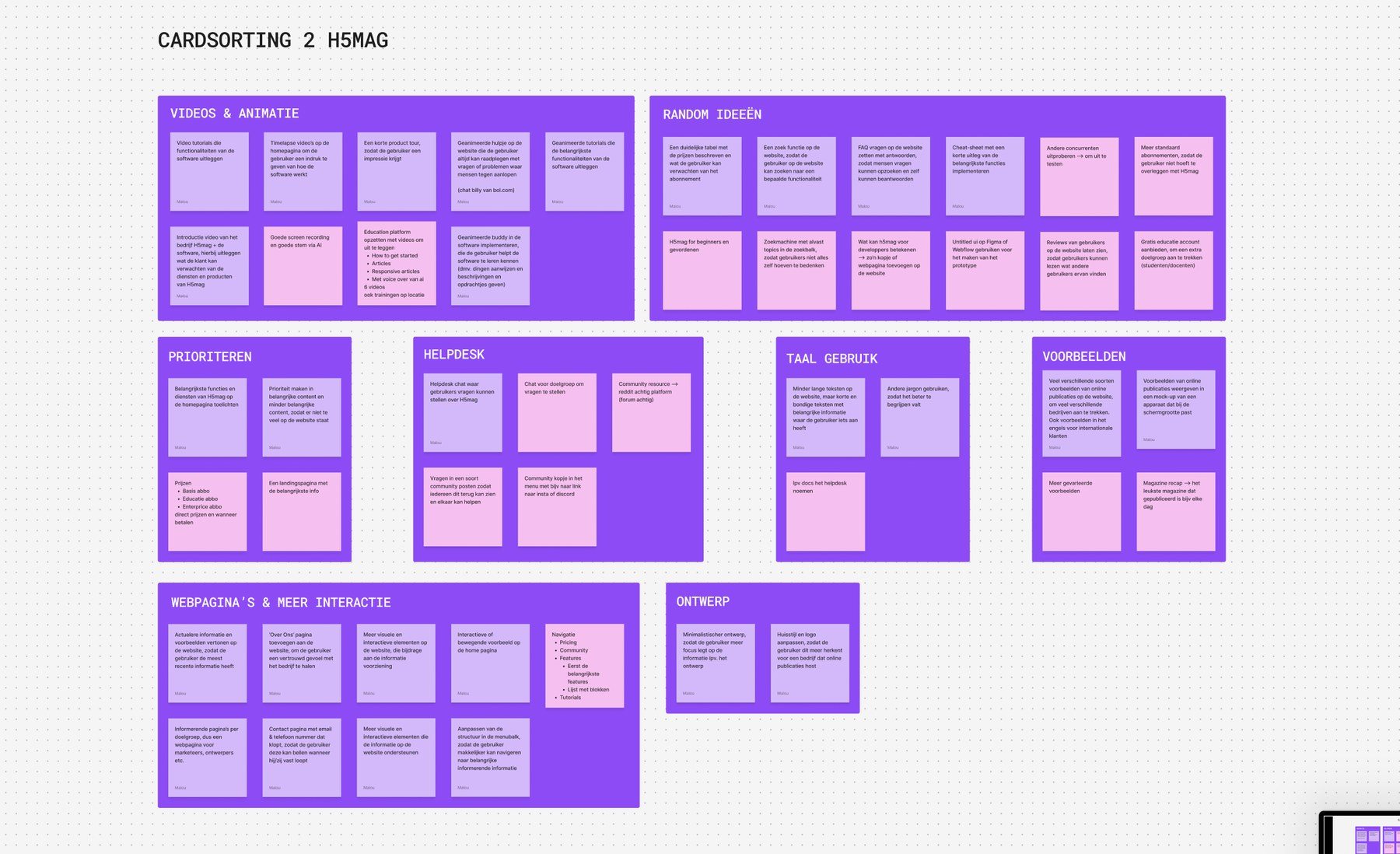
The second round merged them into eight. Videos and animation became one group, and web pages and more interaction became one that now also holds navigation. The helpdesk, language, prioritising, examples and design groups stayed as they were.

Several of these ideas made it into the Hi-Fi prototype, the product tour and the FAQ on the pricing page among them.

Second card sort of the H5mag ideas, merged into eight clusters

From there I turned the research into user needs written as user stories, one sentence each saying who wants what and why, every one of them referencing the interview or test it came from. That mattered more than it sounds: every requirement, and then every design decision built on it, could be pointed back at its evidence instead of at my taste. Those user needs became the system requirements, the list of what the site has to be able to do. Then a Lo-Fi prototype, a rough version with no styling on it, and then the Hi-Fi one, which looks and behaves like the real site. You can click through the H5mag prototype, or open the design file to see how it is put together.

Structure

Two pages became one

Benefits and Features were the pages nobody could tell apart, so I merged them into a single Product page. And Showcases became Examples, because that is the word the users themselves used. Both decisions trace back to system requirements I had written from the research: the system supports the user while navigating, and the system uses the user’s own vocabulary.

Colour

Giving the brand’s pink a job

The existing house style ran on a bright pink and a bright purple. Together they shout and neither leads. I darkened the purple so the pink could carry attention instead of competing for it, and then only spent that pink where attention was worth something: the product tour block, and every hover state connected to navigating. Navigation was the core problem, so the most visible colour in the palette went to it.

Reversed by testing

The second table had to go

The pricing page got two blocks showing what each subscription includes. Testing the Lo-Fi prototype, users liked that overview, and then got confused by a second comparison table further down the same page. Two comparisons of the same thing, and one of them had to go. It came out.

From a colleague

An overview of the integrations

A colleague pointed out that the paid add-ons might be interesting to people on a pricing page. I was not sure, so I built it and watched for it in the Hi-Fi test. Users said it helped, because it told them what was possible before they committed.

For the client

An FAQ that answers the phone

H5mag’s own user need was fewer phone calls, so the pricing page ends with an FAQ covering subscriptions, payments and cancelling. That block is not there for the visitor’s benefit alone. It is there because a small company cannot keep answering the same three questions by phone.

The same four tasks, before and after

I tested the prototype the same way I had taken the baseline: same scenario, same four tasks, same think-aloud method, so the two could actually be compared.

TaskOn the live siteOn the prototype
Find out what the software doesRead the icons and got nothing from them. No clarity on what it could do. Wanted a route to the trial much earlier.Product tour and features shown with GIFs. “I immediately have an idea what to expect.”
Find the pricingCould not find what a subscription includes. Confused and irritated, the FAQ did not help, and he abandoned the task.Two subscriptions side by side, easy to compare, extra options visible. “A very clear story.”
Find help with a functionTried Features, Benefits and Examples. Columns of text, “enormously messy”. Found the documentation and could not face searching it.“The features are shown very clearly.”
Find an example publicationGot there via Showcases, the one task that worked.“Seems logical to go to Examples.” Clear, and a route to ask a question in the footer.

On the live site he said he would normally have closed the page immediately, and that he still did not know what he could do with the software. On the prototype, asked where he got stuck: he did not.

If I take one thing from this project into the next, it is that baseline. It was the single most useful decision in six months. Without it, “the new one is better” is just my opinion.

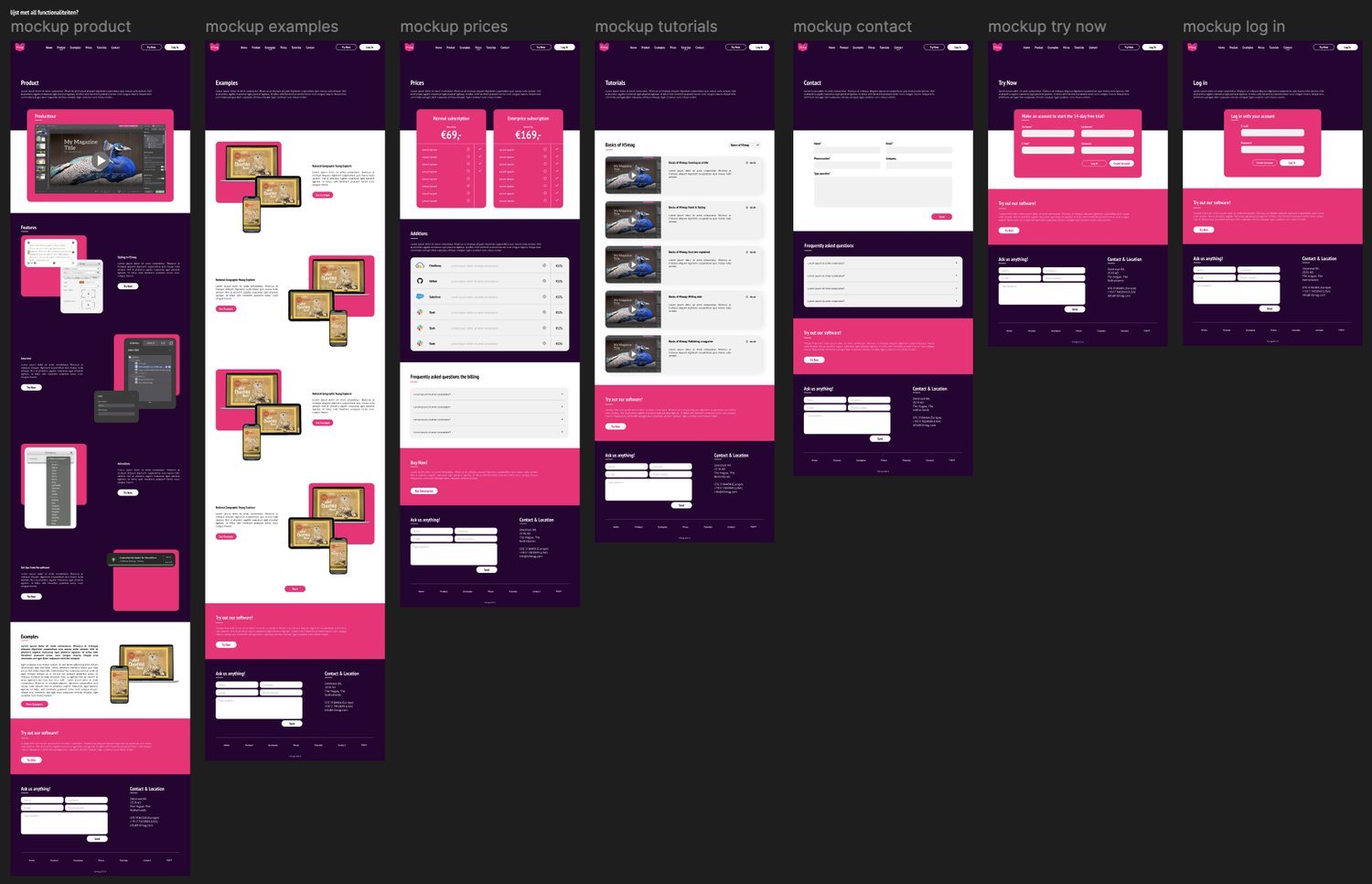
The seven pages of the redesign. Benefits and Features merged into one Product page, Showcases became Examples, and the pink only turns up where it has a job to do.

The seven redesigned H5mag pages: product, examples, prices, tutorials, contact, trial and log in

Blazter.nl

Seven months as an intern, on live client work from week one.

Years
2020 – 2021
Type
Agency internship
My role
Third-year intern, seven months
Clients
Varied, under NDA

In short

The problem
Live briefs for very different clients, from websites and campaign sites to packaging and print, on agency deadlines.
My role
Third-year intern for seven months, doing the same work as the designers from the first week. The clients are under NDA.
The result
I learned to turn a debrief and the user needs behind it into a website made to measure, and grew my design skills across websites, packaging, labels, magazines, brochures and flyers. The label range for a cosmetics brand shipped with my designs.

The assignment

Where I learned to work to someone else’s brand.

I spent seven months at advertising agency Blazter as a third-year intern, working on websites, campaign sites, product packaging and print, for clients who had nothing in common except a deadline.

It was not a placement with a project attached. Interns there did the same work as the designers, on live client jobs, from the first week. I presented my first redesign to the client myself and had to justify the choices in the room.

Agency work teaches a specific thing: your taste is not the brief. Most of these projects came with an existing house style, a client with a view, and a schedule measured in days rather than months.

A note on what you see here. I signed an NDA covering this work, so the clients are described by sector and nothing is shown that would identify them. What I did and why is all mine to tell, and that is what is below.

The work

Six briefs, six different problems.

Taken together these are the projects where I stopped waiting to be told what to do. The short version of each is below: the situation, the call I made, and what came of it.

Catering · solo

An ordering site for a catering company

A catering business with no website at all wanted to sell lunch boxes online, with customers putting a box together themselves. I ran this one on my own, starting from the debrief. Then I compared the food box companies already in the market: what they sell, how they sell it, and what every one of them does the same way. The thing almost none of them offered was letting you build your own box, so that became what the homepage leads with, at the very top where nobody has to go looking for it, with the benefits sitting beside the offers so there is a reason to keep reading. I designed desktop first, because that was the version the client cared about most, and chose a sea blue none of the competitors used and that fitted the warm, tropical character of the brand. Delivered as a brand style plus a desktop and mobile design.

Politics · duo · 3 days

A campaign site for a new political party

A newly founded party needed a website before the elections so voters could find their positions online. Their existing design did not meet expectations and only the desktop version was in scope. I worked in a pair, and we had roughly three days to redesign and build the whole thing. We designed the homepage together first and then treated it as the rule set for every other page, which is what made three days possible at all.

Retail · solo

A website for a bicycle shop

The shop’s menu bar was cluttered, and customers were either not using the site or dropping out halfway through it. I studied competing shops and wrote down what they got right and wrong. The pattern that mattered: almost all of them put opening hours, contact details and location on the homepage, because that is usually the reason someone visits a bike shop’s site in the first place. I rebuilt the structure from a sitemap, which let the menu be organised the way people actually looked for things. The client’s verdict was that it finally worked the way they expected.

Photography · solo

A portfolio site for a photographer

The brief was a portfolio site, and the photography was strong enough that the design had one job: stay out of its way. I chose colours that complemented the work so the images stayed the focal point, and looked for distinctiveness somewhere other than the imagery: in the layout of the menu and in playful interaction. The design was largely built, with some adjustments by the photographer herself.

Packaging · duo, then solo

Product labels for a natural cosmetics brand

Labels for a full range of teas, soap and body butters, in the brand’s existing house style. The constraint drove the design: every label went onto black packaging, so that had to be accounted for from the first sketch rather than discovered at print. I started with a colleague who was moved to another project partway through, so I designed most of the final labels myself. It was my first packaging work, and the whole range shipped with it.

Print · duo

A magazine for a homelessness charity

A charity wanted a magazine of articles about people who had been or still were homeless, including interviews with well-known names. We researched how other magazines organise their content, and used that to build templates for the different page types instead of designing each page from scratch. The magazine was never published, because the lockdowns stopped it, but the template system was the part worth keeping.

What I took with me

A way of working I still follow.

The biggest thing I took from Blazter: turning a debrief and the user needs behind it into a website made to measure. Every client arrived with a different audience, house style and goal, so there was no template to fall back on. Each site had to start from what that client and their users actually needed.

It also gave me a way of working I still follow. Read the debrief and turn it into something concrete. Build a sitemap, the map of what pages exist and how they nest, before drawing anything. Compare the competitors. Sketch, then mock up, then iterate. Ask for feedback and actually use it. And check the design with the developer who has to build it, before it goes anywhere. That last step is the one that gets skipped, and it is the one that stops a design being quietly rebuilt into something else.

Then craft, taught to me by a colleague in my first weeks: use far more whitespace than feels natural, and put it on a system rather than by eye. Spacing in multiples of eight. It is the least glamorous thing I learned there and I have used it every day since.

And it is where my design skills grew the most. Next to websites I designed packaging, labels, magazines, brochures and flyers. Each medium has its own constraints, and having worked in all of them makes me quicker at spotting which constraint is actually driving a design.

Last, working inside someone else’s rules without going quiet. A house style, a three-day deadline or a client who wants something I would not have chosen are not reasons to stop making arguments, they are the conditions the argument has to fit.

James Lakeland.

Running the social design for a London clothing brand, entirely remote.

Years
2019 – 2020
Type
Part-time, alongside studies
My role
Sole social designer
Setup
Fully remote

In short

The problem
A London clothing brand needed its social media designed, with the whole job running remotely.
My role
Sole social designer, part-time alongside my studies.
The result
Banners, posts and Instagram highlights inside the brand's house style. A number of the highlights are still in use.

The assignment

Remote work for a London clothing brand.

Alongside my studies I worked as a designer for James Lakeland, a clothing brand based in London. The whole job ran over online calls, which in 2019 was still unusual rather than normal.

I made the online advertising: banners, Instagram posts and Instagram highlights. Everything had to sit inside the brand’s existing house style, which meant a tight, restrained look I had to work within rather than around.

I was the only designer on their social channels, so within that house style the creative decisions were mine.

What I made

Banners, posts and Instagram highlights.

Most of the work was posts advertising an event or a discount: a real message, a real date, and a format that has about one second to land. A number of the Instagram highlights the brand still uses are mine.

Being the only designer meant there was no one to hand a half-finished idea to. It is the first job where I had to decide something was finished and then live with it being published.

What I took from it

Designing inside someone else's house style.

This was not UX work and I would not present it as such. What it gave me was the habit of designing inside a house style that was not mine, for an audience that was never going to read carefully, with a client in a different country and a different time zone.

Every one of those is still true of the work I do now.

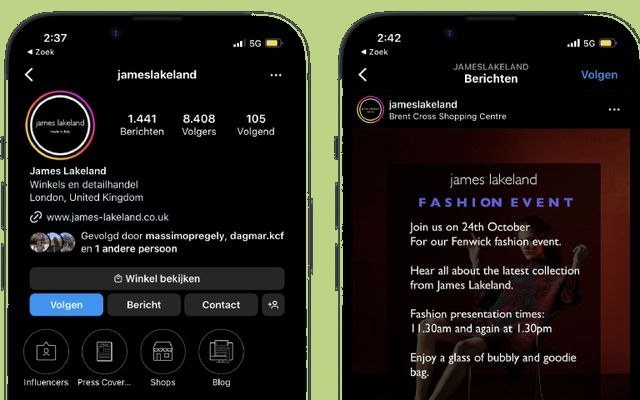
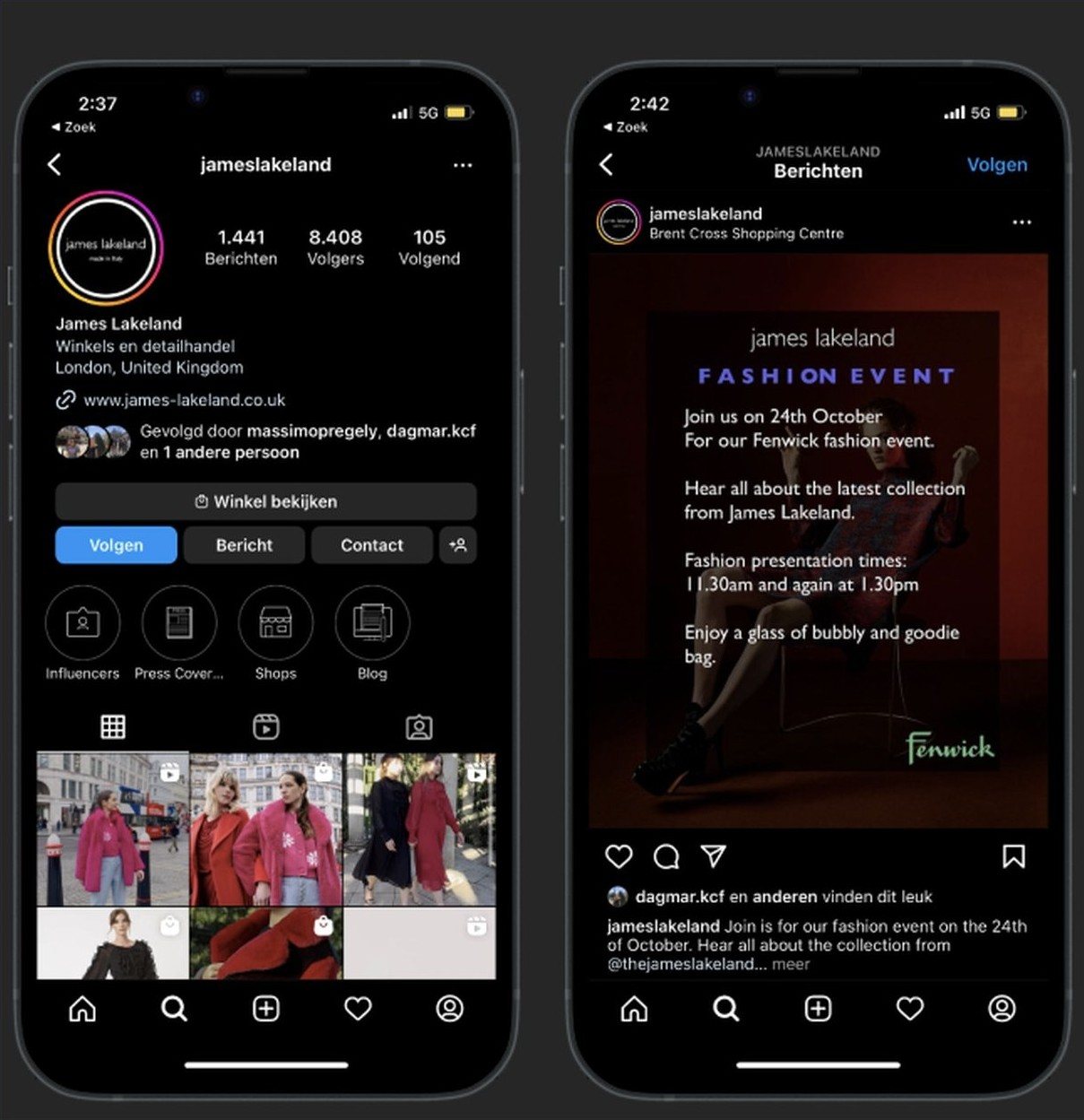
Instagram highlights and a campaign post, designed inside the brand’s existing house style.

Two Instagram screens designed for James Lakeland

VR forest.

Peaceful Forest: an escape from corona quarantine.

Years
2020 – 2021
Type
Study project
My role
Concept and build, in a pair
Tools
Unreal Engine, Unity, Oculus Rift

In short

The problem
Learn a technology none of us had touched, with an open brief, in the middle of the pandemic.
My role
Concept and build, in a pair, in Unreal Engine and Unity for the Oculus Rift.
The result
A calm VR forest with animals and sound and nothing to do, designed for rest rather than spectacle.

The assignment

Technology none of us had touched.

This came out of a course on new technologies during my studies. The point of the assignment was to get to grips with something we had never used before, so I spent it learning how a virtual reality world is actually made, and how to build one in Unreal Engine and Unity.

I worked on it with a fellow student. We brainstormed the concepts for the environment together before either of us opened an engine.
The decision

We could build anything, so we asked what people needed.

An open brief is harder than a narrow one. We could have built a game, a puzzle, a showcase of effects. We chose a calm environment instead, for one reason: this was the middle of the pandemic. During the lockdowns you could not always go outside, and not at all when you had corona yourself, while nature and fresh air matter a lot to people. So we decided to build an escape: a VR environment that takes you outdoors.

So the design goal became rest rather than spectacle. That single decision settled everything else: the pace of the world, the absence of tasks, what the user is supposed to do in there, which is nothing.

The result

A forest with animals, sound and nothing to do.

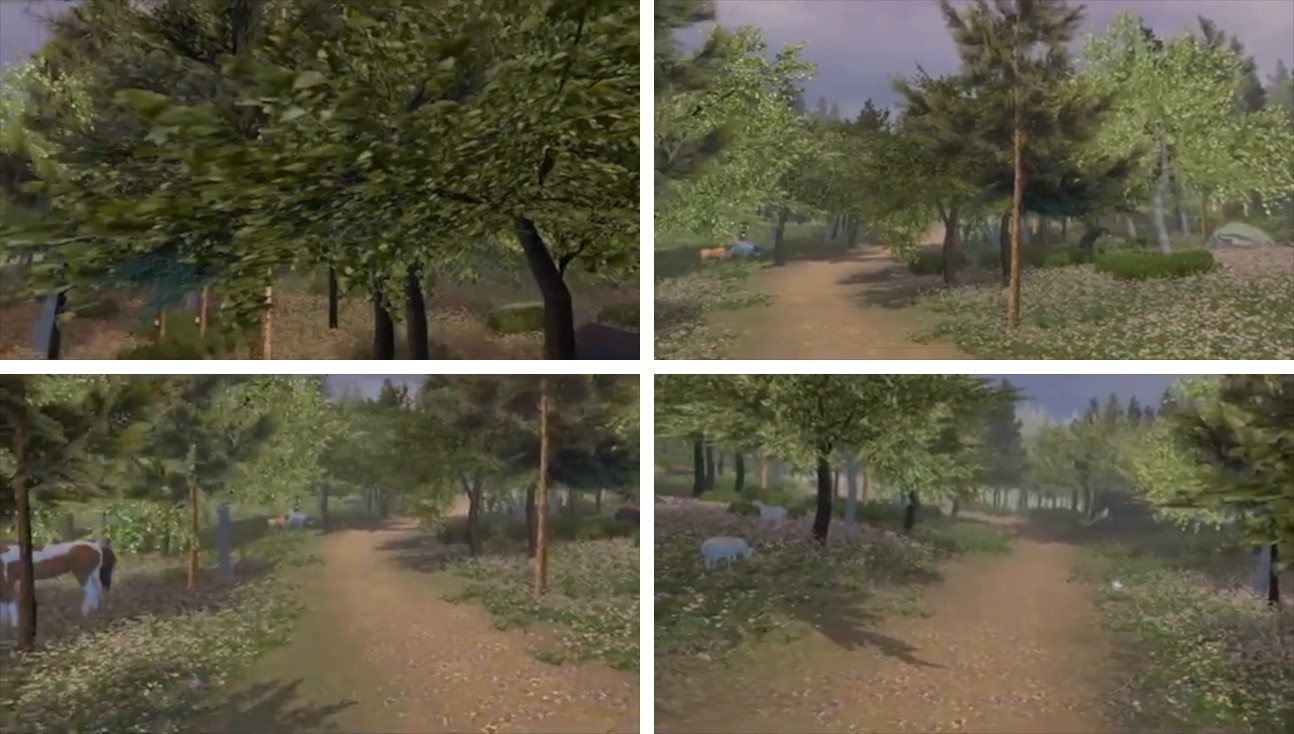
The finished environment is a forest with animated animals and sound: horses, cows, buffalo, sheep, rabbits and one entirely unexplained elephant. There is no objective. You stand in it, you look around, and for a few minutes you are not inside the four walls everybody was stuck in. Walking around and interacting with the animals were on the list for a next version, not in this one.

What designing for VR taught me that a screen never does: there is no frame to compose. The user decides where to look, so you cannot control the first thing they see, you can only make every direction worth looking in.

In the forest

Four frames from the environment: a path through the trees, a horse grazing at the side, sheep further along. Nothing in it asks anything of you.

Four frames from the VR forest: a path through the trees, a horse and sheep grazing

A walkthrough of the environment, recorded off the headset. The capture is soft, which is why it sits small here.

The Doggo Bag.

Getting dog owners to show us their week instead of describing it.

Year
2020
Type
Study project, client brief
My role
Research, in a team of six
Method
Cultural probe

In short

The problem
A food and personal care company wanted to know what dog owners actually need.
My role
Research, in a team of six, using a cultural probe.
The result
Six owners, one week. Two insights and a design question handed to the client's design team, each traceable to the diaries.

The assignment

A client who wanted to know what a group of people actually needs.

The brief came from a company in food and personal care that wanted to move into new markets with products and services that have an online or connected side to them. A marketing agency had already pointed at a handful of subcultures worth looking at. Our job was the step after that: find out what actually lives inside one of them, and hand the client's design team directions they could build on.

We each started by meeting someone from a subculture of our own choosing, photographing what stood out and writing down one story. Laid side by side, those visits pointed at pet owners, and we narrowed that to people with a dog.

From a mindmap to one question

A mindmap of everything to do with owning a dog gave us costs, food, care, holidays, time and the relationship with the animal. Five of those looked worth studying, which is four too many for a project this size. We chose the relationship between dog and owner, because every other topic turned out to hang off it.

The main question became: how does having a dog influence the choices someone makes in daily life? Deliberately about daily life, because a question you cannot picture is a question you cannot answer.

The method

Four assignments, each aimed at a different kind of answer.

A cultural probe is a package you hand over and then leave alone. The participant lives with it for a week and fills it in on their own terms, which gets you what people do rather than what they remember doing. For a question about habits that is the whole point: nobody can describe a routine they stopped noticing years ago.

Those four sub-questions each got their own assignment, plus an instruction booklet so every participant knew what to expect without one of us standing next to them.

Sub-question 1

Why did you get a dog in the first place?

The motive behind the decision, because it sets the expectation everything else is measured against.

Sub-question 2

How does the day get arranged around the dog?

Not whether it takes time, but which parts of the day move and what gets dropped to make room.

Sub-question 3

What gets spent on things the dog does not strictly need?

Discretionary spend is where affection shows up as behaviour, which is more reliable than asking someone how much they love their dog.

Sub-question 4

What has the dog done to the owner emotionally?

The one the client cared about most, and the one people are least able to answer on the spot.

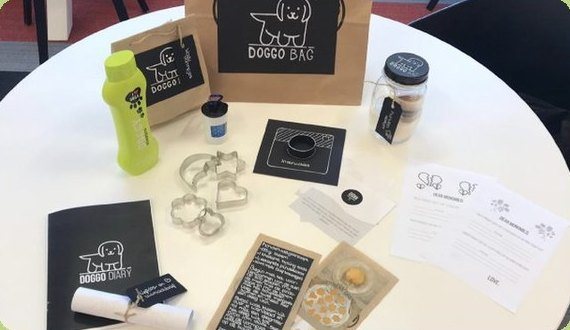
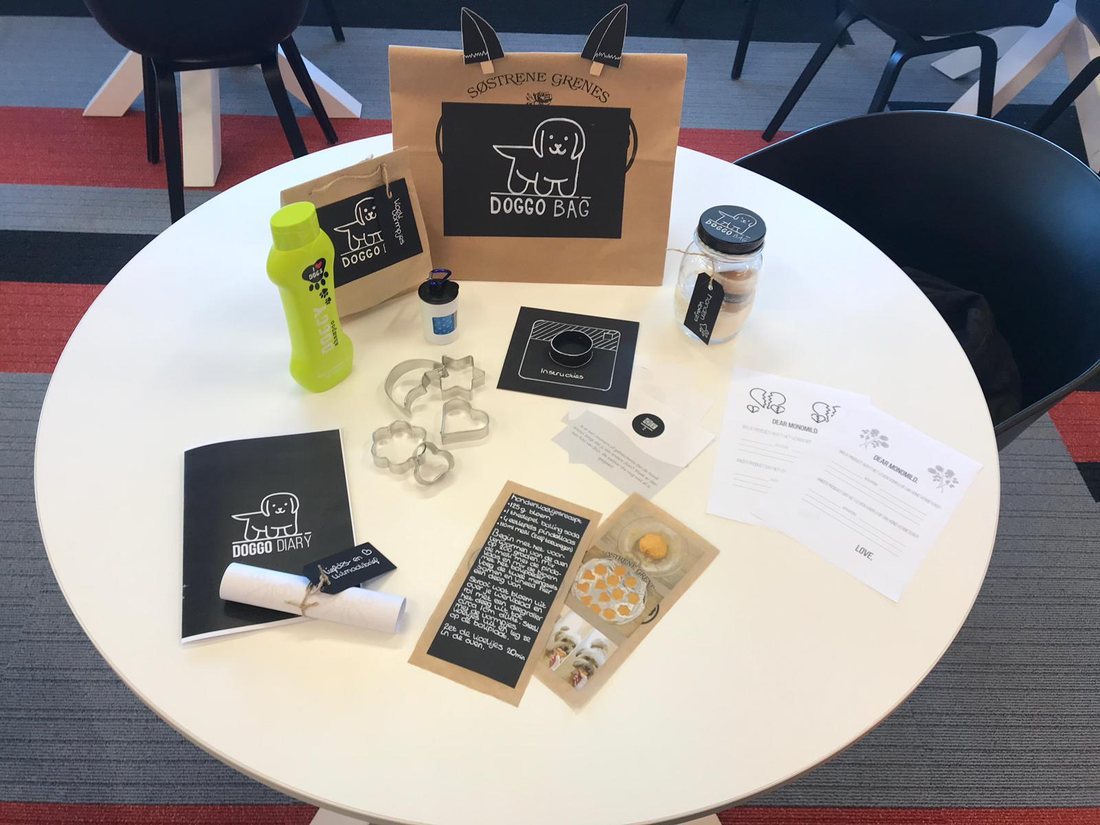
What was in the bag

A diary with a page per day. Open questions about how the day went and what the dog did to their mood, a few closed ones for the numbers, and an opening page for the dog’s age, the reason they got it and what they spent that week.

A photo assignment: photograph the objects, places and moments the dog puts in your week, and explicitly not the dog itself. An alarm set early for a walk tells us more than another portrait does.

A personal inventory: photographs of everything in the house that was changed for the dog. A corner of the living room cleared out says more about where the animal sits in the family than a direct question ever gets.

And a love letter and a break-up letter, addressed to the client rather than to us. One about a product that makes life with a dog better, one about a product they cannot stand. Written to a company, people say things they would never say to a researcher taking notes.

The finished Doggo Bag with the diary, the biscuit jar, the cutters, the shampoo and the two letters laid out around it

Why it was made this carefully

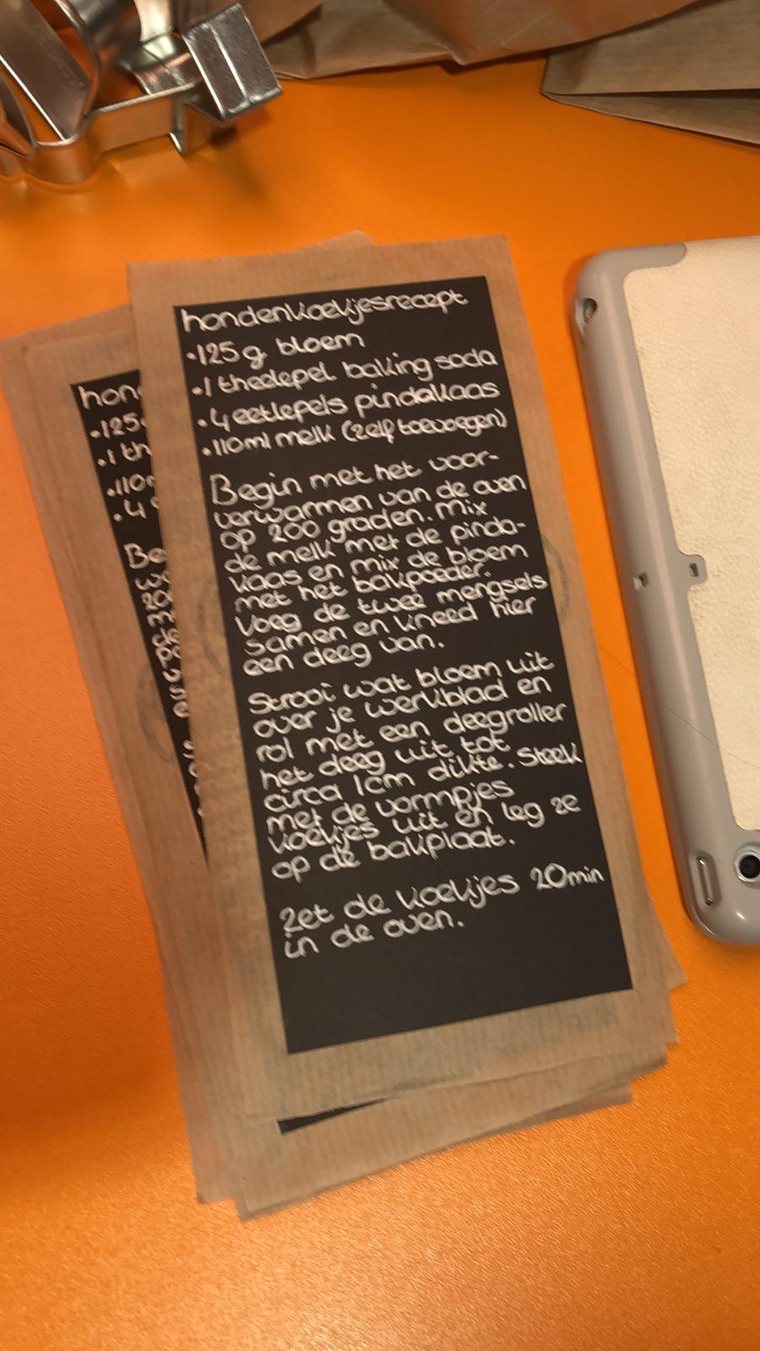
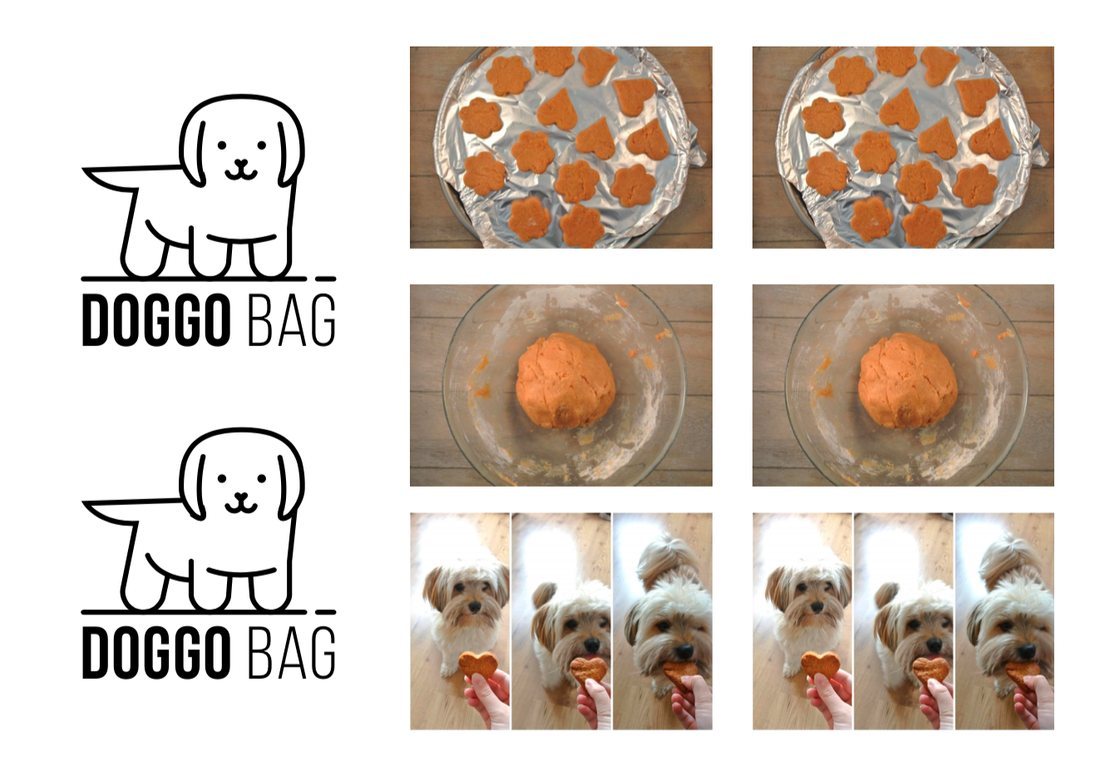
The jar of biscuit mix, the bone shaped cutters and the hand lettered recipe were not decoration. They gave the owner and the dog something to do together, which is the behaviour we were asking about, and they gave us a reason for the package to stay on the kitchen table all week instead of in a drawer.

A probe only returns anything if someone wants to pick it up. That is the part of this project I would defend to a client.

The hand lettered dog biscuit recipe cards from the probe

Running it

Six owners, one week, and a handover that did half the work.

Each of us found a dog owner and delivered the probe in person instead of posting it. That ten minute handover is the part I would keep: we walked them through the week, and not one participant had to come back to us with a question while it was running. A probe that needs explaining halfway through has already lost you a day of data.

After a week we collected the packages and went through what had been filled in with the owner.

The part that did not go well. We were supposed to reserve an hour for that closing conversation, and not everyone picked that up in time, so part of the team only collected the box. We recovered what we could afterwards by phone and message, but a conversation in a doorway is not the same as one at the kitchen table with the diary open between you. If I ran this again, the evaluation would be booked as its own appointment at the moment the probe is handed over, not arranged at the end of the week.

What came back

Two insights, and a question the client could design against.

We wrote out every answer and sorted it by question rather than by participant. That one choice is what made the patterns visible: read down a question and you see six people agreeing or disagreeing, read down a participant and you only see a week. Then we looked for links between what people wrote in the diary during the week and what they said once it was over.

Two insights carried the rest. People get a dog for the company it gives them. And people are measurably happier on the days they spend more time with it.

Next to those sat a third thing the diaries kept returning: the schedule. Almost everyone said they wanted more time with their dog, and almost nobody had room for it.

Our first design question was how to give owner and dog more quality time despite a busy schedule. We sharpened it, because despite quietly accepts that the day has to suffer for it. The question we handed over was: how can we let dog owners spend more time with their dog without that having a negative effect on the rest of their day?

That went to the client's design team with the evidence underneath it, so every direction could be traced back to the diary page it came from.

What I took from it

The method is a design decision.

How you ask shapes what you get back. A questionnaire would have given us what these people believe about their dog. A box on the kitchen table gave us their week: the alarm set early, the corner of the room given up, the money spent on something nobody needed.

The second lesson is less flattering and I keep it deliberately. We spent so long making the probe beautiful that we under-invested in the questions inside it. The diary could have gone deeper on feeling, and we only found that out while coding, which is too late to fix. Craft is not the same as rigour, and a research instrument is judged on what it returns rather than on how it looks.

Both of those still apply at work. Choosing the method is the first design decision of any project, and the prettiest artefact in the room is not automatically the one answering the question.

The identity we gave it, and the biscuits actually being made and eaten, which is the behaviour the probe was asking about.

The Doggo Bag logo, the biscuits being baked and the dog eating one